Calibrate Bale Shape Sensors
This procedure is used to calibrate the left-hand, right-hand, and center bale shape sensors. Calibration can be performed individually or on all three sensors in sequence, as necessary.
Calibrate Left-Hand Bale Shape Sensor
-
From the baler application main page, select the Settings softkey.
E84879-UN-09OCT17 -
Select the Calibration softkey.
E64646-UN-11MAY12 -
Select the Left-Hand Bale Shape Sensor calibration softkey.
E66966-UN-09AUG12 -
Select Start Calibration on the monitor.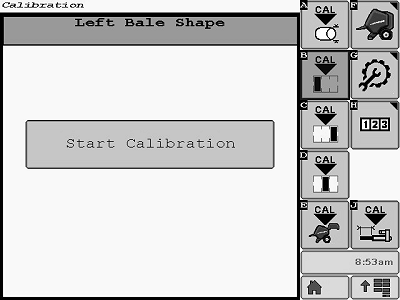
E85287-UN-01NOV17 -
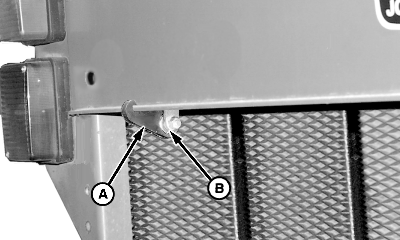
E48271-UN-06JUL00A - Bale Shape Gauge Strap
B - Bearing
Two methods are available to adjust the bale shape sensor on the rear gate of the baler.Bale shape gauge strap (A) is available through your John Deere dealer or qualified service provider.
-
If the bale shape gauge strap (A) is used:
- Install strap (A) over the roller bearing (B).
- Attach the end of the strap over the baler frame cross-member. Make sure that the lip of the cross-member is seated in the strap.
-
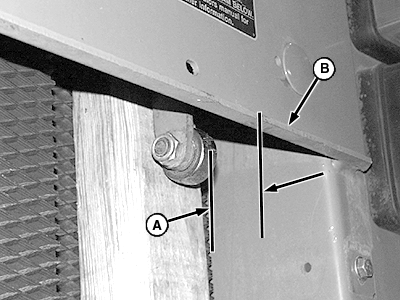
E47620-UN-07JAN00A - Dimension, 62 mm (2-7/16 in)
B - Rear Edge of Panel
If bale shape gauge strap is not used:- Put a board approximately 51 x 102 x 457 mm (2 x 4 x 18 in) between the roller bearing and belt as shown.
- Position the board to hold the bale shape sender arm so that the rear of the roller bearing is 62 mm (2-7/16 in) (A) from the rear edge of panel (B).
-
-
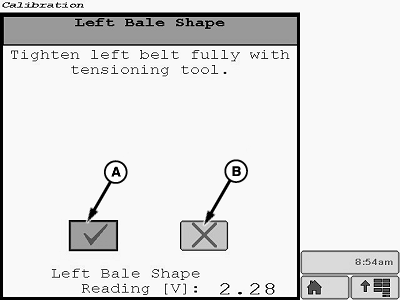
E85288-UN-01NOV17A - Task Completion Box
B - Cancel Calibration Box
Once the bale shape sensor has been positioned, select the task completion box (A). If necessary, select the cancel calibration box (B). -
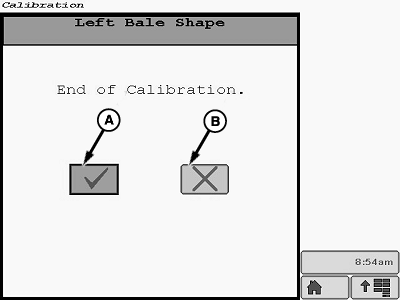
E85289-UN-01NOV17A - Task Completion Box
B - Cancel Calibration Box
When the End of Calibration screen appears on the monitor, select the task completion box (A). If necessary, select the cancel calibration box (B). -
After the task completion box is selected, the Calibration Successful screen is displayed.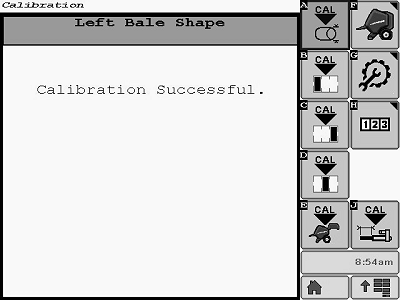
E85290-UN-01NOV17 -
If additional calibrations are necessary, the desired calibration softkey can be selected from the main menu on the current display screen.
To return to the baler application main page, select the Main Page softkey.
E84866-UN-05OCT17
Calibrate Right-Hand Bale Shape Sensor
-
From the baler application main page, select the Settings softkey.
E84879-UN-09OCT17 -
Select the Calibration softkey.
E64646-UN-11MAY12 -
Select the Right-Hand Bale Shape Sensor calibration softkey.
E66967-UN-09AUG12 -
Select Start Calibration on the monitor.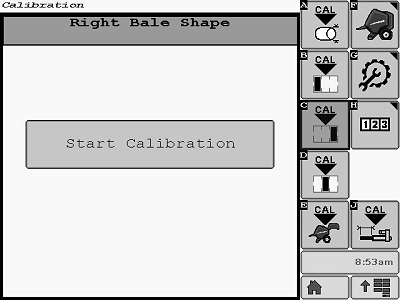
E85291-UN-01NOV17 -
E48271-UN-06JUL00Left-Hand Side Shown
A - Bale Shape Gauge Strap
B - Bearing
To adjust the bale shape sensor on the rear gate of the baler there are two methods available.Bale shape gauge strap (A) is available through your John Deere dealer or qualified service provider.
-
If the bale shape gauge strap (A) is used:
- Install strap (A) over the roller bearing (B).
- Attach the end of the strap over the baler frame cross-member. Make sure that the lip of the cross-member is seated in the strap.
-
E47620-UN-07JAN00Right-Hand Side Shown
A - Dimension, 62 mm (2-7/16 in)
B - Rear Edge of Panel
If bale shape gauge strap is not used:- Put a board approximately 51 x 102 x 457 mm (2 x 4 x 18 in) between the roller bearing and the belt as shown.
- Position the board to hold the bale shape sender arm so that the rear of the roller bearing is 62 mm (2-7/16 in) (A) from the rear edge of panel (B).
-
-
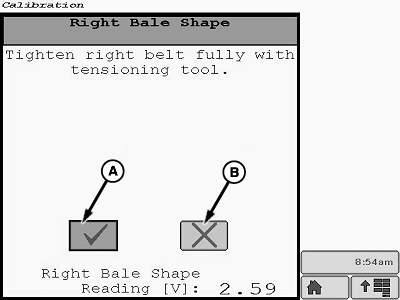
E85292-UN-01NOV17A - Task Completion Box
B - Cancel Calibration Box
Once the bale shape sensor has been positioned, select the task completion box (A). If necessary, select the cancel calibration box (B). -
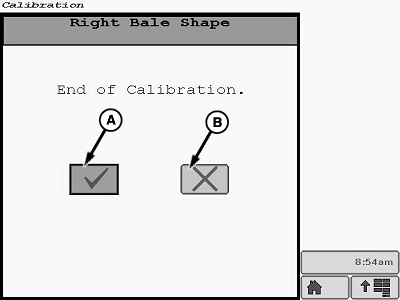
E85293-UN-01NOV17A - Task Completion Box
B - Cancel Calibration Box
When the End of Calibration screen appears on the monitor, select the task completion box (A). If necessary, select the cancel calibration box (B). -
After the task completion box is selected, the Calibration Successful screen is displayed.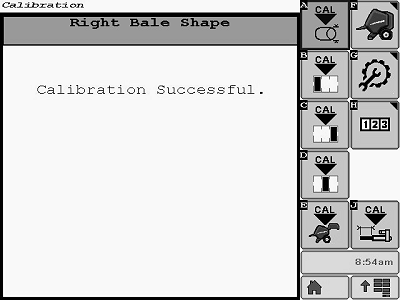
E85294-UN-01NOV17 -
If additional calibrations are necessary, the desired calibration softkey can be selected from the main menu on the current display screen.
To return to the baler application main page, select the Main Page softkey.
E84866-UN-05OCT17
Calibrate Center Bale Shape Sensor
-
From the baler application main page, select the Settings softkey.
E84879-UN-09OCT17 -
Select the Calibration softkey.
E64646-UN-11MAY12 -
Select the Center Bale Shape Sensor calibration softkey.
E66968-UN-09AUG12 -
Select Start Calibration on the monitor.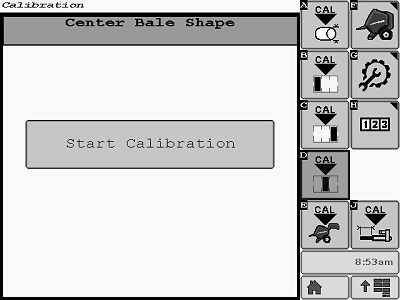
E85295-UN-01NOV17 -
E48271-UN-06JUL00Left-Hand Side Shown
A - Bale Shape Gauge Strap
B - Bearing
To adjust the bale shape sensor on the rear gate of the baler there are two methods available.Bale shape gauge strap (A) is available through your John Deere dealer or qualified service provider.
-
If the bale shape gauge strap (A) is used:
- Install strap (A) over the roller bearing (B).
- Attach the end of the strap over the baler frame cross-member. Make sure that the lip of the cross-member is seated in the strap.
-
E47620-UN-07JAN00Right-Hand Side Shown
A - Dimension, 62 mm (2-7/16 in)
B - Rear Edge of Panel
If the bale shape gauge strap is not used:- Put a board approximately 51 x 102 x 457 mm (2 x 4 x 18 in) between the roller bearing and the belt as shown.
- Position the board to hold the bale shape sender arm so that the rear of the roller bearing is 62 mm (2-7/16 in) (A) from the rear edge of panel (B).
-
-
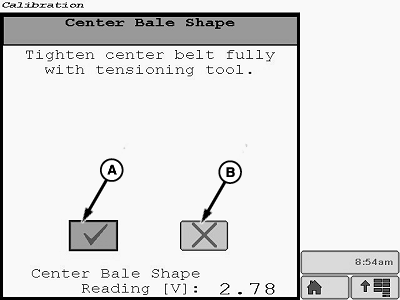
E85296-UN-01NOV17A - Task Completion Box
B - Cancel Calibration Box
Once the bale shape sensor has been positioned, select the task completion box (A). If necessary, select the cancel calibration box (B). -
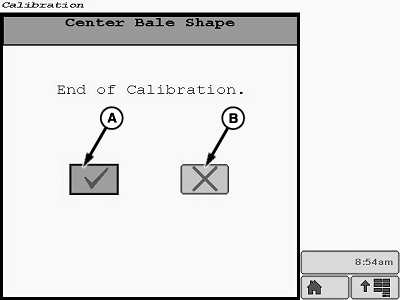
E85297-UN-01NOV17A - Task Completion Box
B - Cancel Calibration Box
When the End of Calibration screen is on the monitor, select the task completion box (A). If necessary, select the cancel calibration box (B). -
After the task completion box is selected, the Calibration Successful screen is displayed.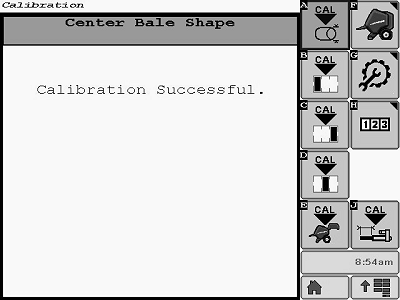
E85298-UN-01NOV17 -
If additional calibrations are necessary, the desired calibration softkey can be selected from the main menu on the current display screen.
To return to the baler application main page, select the Main Page softkey.
E84866-UN-05OCT17
|
DP99999,0000E7E-19-20180103 |