Calibrate Gate Position Sensor
-
From the baler application main page, select the Settings softkey.
E84879-UN-09OCT17 -
Select the Calibration softkey.
E64646-UN-11MAY12 -
Select the Calibrate Gate Position Sensor softkey.
E84891-UN-09OCT17 -
Select Start Calibration on the monitor.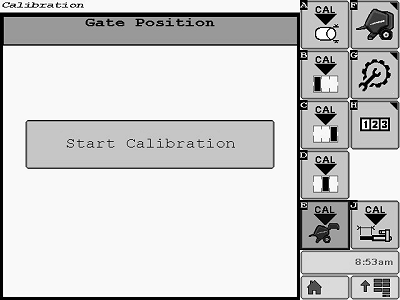
E85299-UN-01NOV17 -
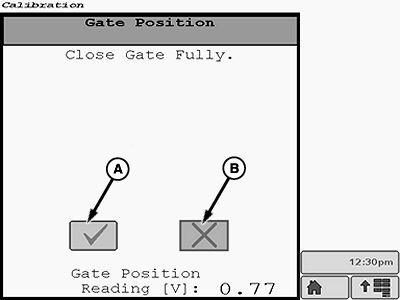
E85300-UN-01NOV17A - Task Completion Box
B - Cancel Calibration Box
Using the tractor SCV, close the rear gate fully. Select the task completion box (A) when the gate is closed. If necessary, select the cancel calibration box (B). -
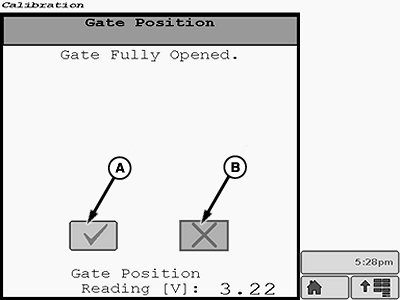
E85301-UN-01NOV17A - Task Completion Box
B - Cancel Calibration Box
Using the tractor SCV, open the gate fully. Select task completion box (A) when the gate is open. If necessary, select the cancel calibration box (B). -
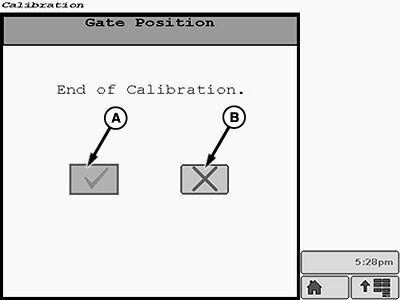
E85302-UN-01NOV17A - Task Completion Box
B - Cancel Calibration Box
When the End of calibration screen is displayed on monitor, select the task completion box (A). If necessary, select the cancel calibration box (B). -
After the task completion box is selected on the End of Calibration screen, the Calibration Successful screen is displayed on the monitor.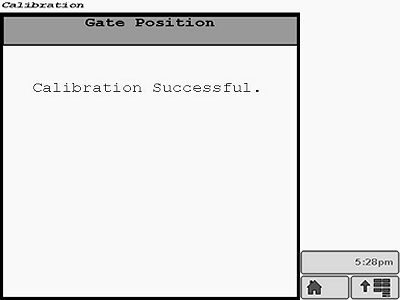
E85303-UN-01NOV17 -
If additional calibrations are necessary, the desired calibration softkey can be selected from the main menu on the current display screen.
Select the Main Page softkey to return to the baler application main page.
E84866-UN-05OCT17
|
DP99999,0000E7F-19-20171031 |