Adjust Bale Shape Sensitivity
-
From the baler application main page, select the Settings softkey.
E84879-UN-09OCT17 -
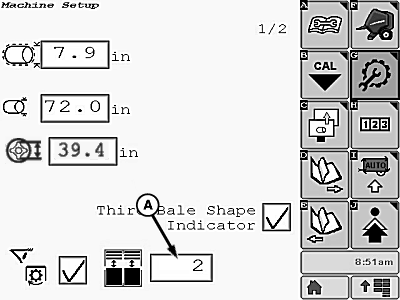
E85574-UN-09NOV17A - Sensitivity Input Box
Select input box (A) and set the bale shape sensitivity from 1 (low sensitivity) to 5 (high sensitivity).The initial factory setting is 2.
-
Select the main page softkey to return to the baler application main page.
E84866-UN-05OCT17
|
DP99999,0000E81-19-20171109 |