Speed Compensation Program
This program uses input from the speed sensor on the PTO slip clutch to maintain selected twine and net wrap settings when the baler is operated below rated PTO speed.
It is recommended that the baler is operated with this program ON. This program helps avoid differences in actual versus selected settings for twine or net wrapping when operating below rated PTO speeds.
The operator must turn on this feature in only one location to activate speed compensation for both twine and net functions.
Activate the Speed Compensation Program for net and twine wrapping as follows:
-
From the baler application main page, select the Settings softkey.
E84879-UN-09OCT17 -
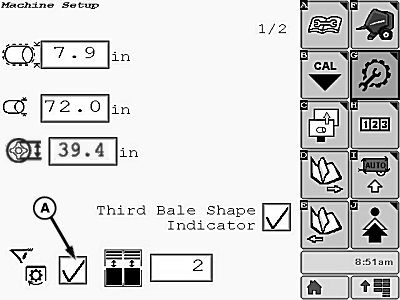
E85575-UN-09NOV17A - Speed Compensation Activation Box
Check the speed compensation activation box (A) to enable speed compensation for net and twine wrapping functions.Disabling the speed compensation functions can allow the baler to operate with a failed speed sensor. Before disabling the functions, check the sensor for proper adjustment and refer to the Troubleshooting section for other related problems. Replace failed parts as soon as possible and reactivate the speed compensation program.
-
Select the Main Page softkey to return to the baler application main page.
E84866-UN-05OCT17
|
DP99999,0000E82-19-20171109 |