Baler Automation Main Page Display Description
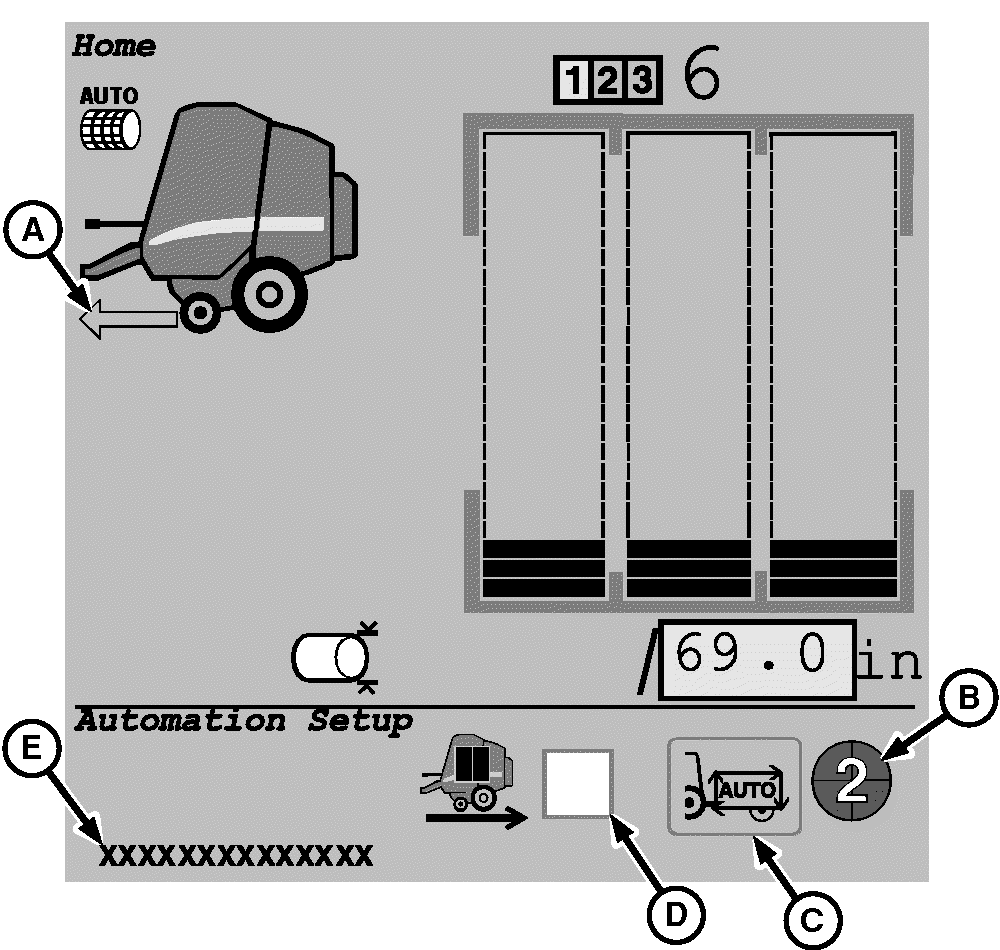
E67305-UN-31AUG12
A - Baler Ready to Go
B - Automation State Pie
C - Enable or Disable Automation
D - Automation Pause Mode
E - Automation Deactivation Message
The baler automation main page allows the baler automation functions to be controlled and monitored while operating in the field.
Arrow (A) indicates that the baler is ready to continue operation in the automation mode after the bale unloading process.
Symbol (B) indicates the current automation state. (See Automation State Pie in this section.)
Icon (C) is used to enable or disable the automation mode.
Automation pause mode (D) can be selected to place the automation mode in a paused state when the desired bale diameter is reached. This function allows the operator to reposition the baler before starting the bale ejection sequence.
Message (E) indicates why automation was deactivated or cannot be activated. (See Tractor-Baler Issues Resulting in Automation Deactivation in the Troubleshooting section.)
|
DP99999,0000EA9-19-20171127 |