Restart or Resume Automation
Restart Automation
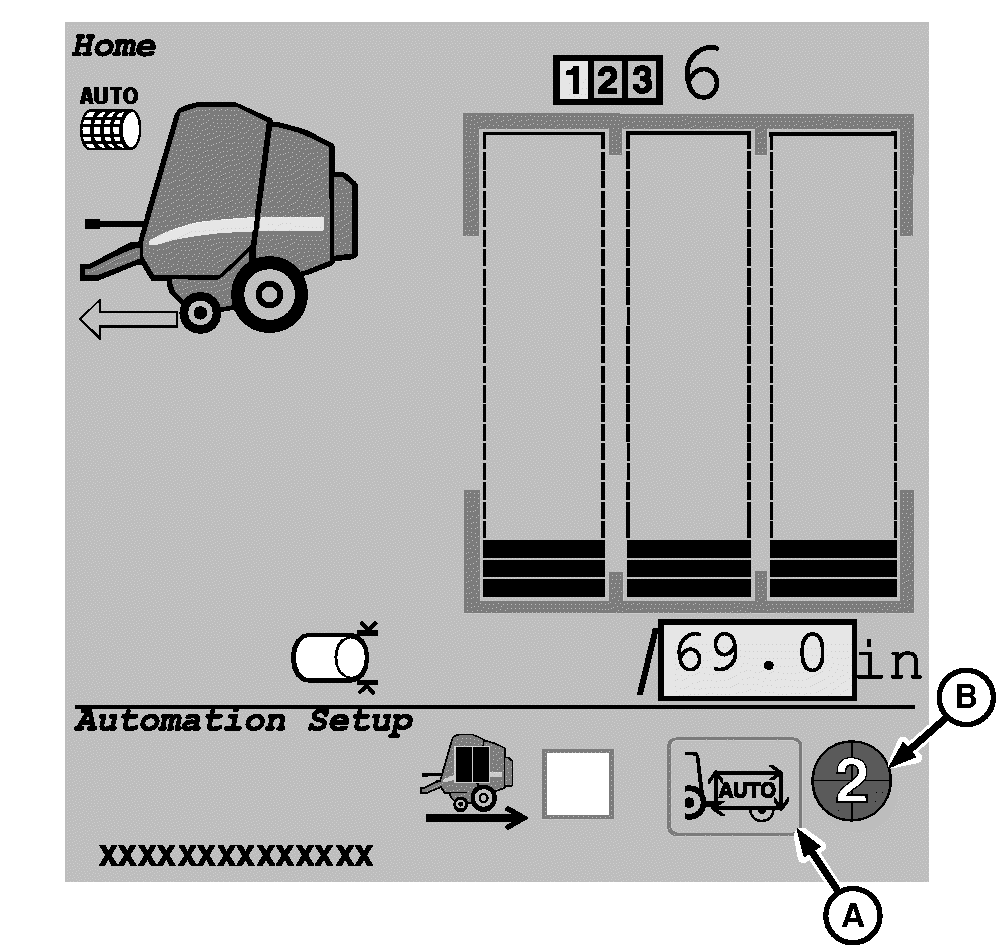
E67470-UN-21AUG12

E76701-UN-29JUL14
Automation Resume Switch
A - Enable or Disable Automation
B - Automation State Pie
-
When automation state pie is Ready-to-Enable (2/4 of pie) (B), select and activate enable automation (A) and then select automation resume switch on tractor. (See tractor operator’s manual for more details.)
-
When automation state pie is Enabled (3/4 of pie) (B), select and activate automation resume switch on tractor. (See tractor operator’s manual for more details.)
Resume Automation
E76701-UN-29JUL14
Automation Resume Switch
If operating the baler in pause mode, select and activate automation resume switch once the baler is in position to eject bale. Selecting the resume switch opens the gate and continues the Automation cycle.
Disabling Tractor and Baler in Automation Mode
E67470-UN-21AUG12
Any of the following actions deactivates tractor and baler automation and return total control of the tractor and baler to the operator:
- Select and activate icon (A) to switch automation state pie to Ready-to-Enable (2/4 of pie) (B).
- Disengage PTO (3/4 of pie) (B).
-
Move tractor reverser lever from forward to neutral or Park
(3/4 of pie) (B).
In Pause Mode, putting the reverser lever in neutral or
park will not disable Automation.
- Depress clutch and stop. Put reverser lever in Park (3/4 of pie) (B).
- Depress SCV lever for gate SCV in either direction (3/4 of pie) (B).
|
PP98408,000004F-19-20140825 |