Check Front Sheet-to-Rubber Roll Clearance
-
Open the net wrap cover. Ensure that the brake lever is engaged.
-
Remove net material.
-
Turn the tractor ignition key to the ON position. Turn the monitor-controller ON.
-
Ensure that the monitor is in the NET mode. Turn the monitor OFF.
-
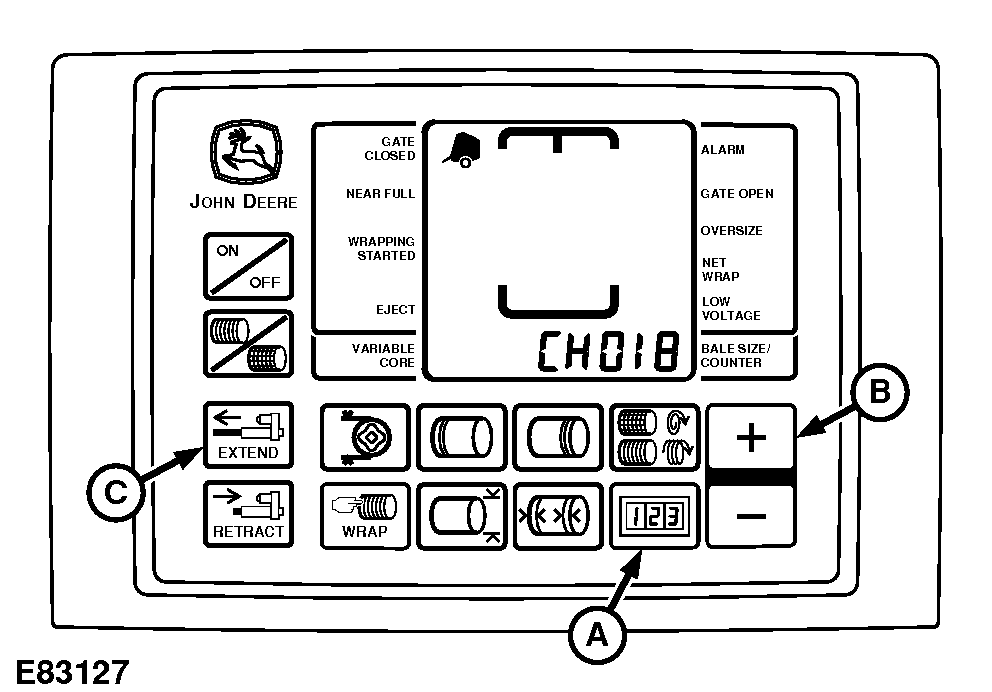
E83127-UN-11MAY17A - COUNTER Key
B - PLUS Key
C - EXTEND Key
Press and hold the COUNTER key (A) while turning the monitor-controller ON. CH001 appears on the display. -
Continue to hold the COUNTER key and press the PLUS key (B) to advance to CH018. Release the COUNTER key.
-
Press and hold the EXTEND key (C) to move the counterknife to the up position.
-
 To avoid personal injury from unexpected knife movement,
disconnect net wrap actuator wire connector or power plug when performing
adjustment or working in area.
To avoid personal injury from unexpected knife movement,
disconnect net wrap actuator wire connector or power plug when performing
adjustment or working in area.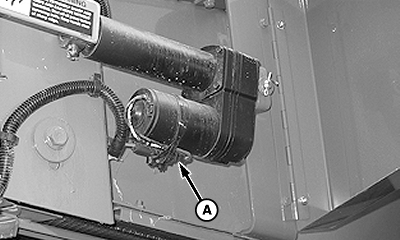
E82724-UN-02MAY17Wrap Actuator
A - Connector
Turn the monitor-controller OFF. Turn the tractor ignition key to the OFF position and remove key. Disconnect the monitor-controller power plug from the power source or disconnect the net wrap wire harness connector (A). -
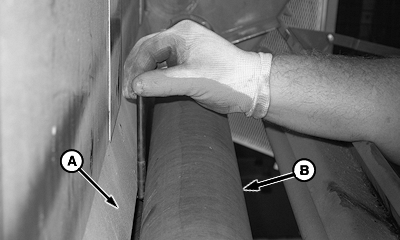
E57351-UN-19JUN09A - Front Sheet
B - Rubber Roll
Check the clearance between the front sheet (A) and entire length of rubber roll (B) with drill bits.Front Sheet-to-Rubber Roll Clearance 3—6 mm (0.12—0.24 in) -
If the clearance is not within specification, bend front sheet to obtain 3—6 mm (0.12—0.24 in) clearance. (See your John Deere dealer.)
|
DP99999,0000D3C-19-20170511 |