Install BaleTrak™ Monitor-Controller in ComfortGard™ Cab
On some tractors, it is necessary to remove the corner post panel to gain access to mounting studs. Holes must be drilled in the panel to install bracket.
-
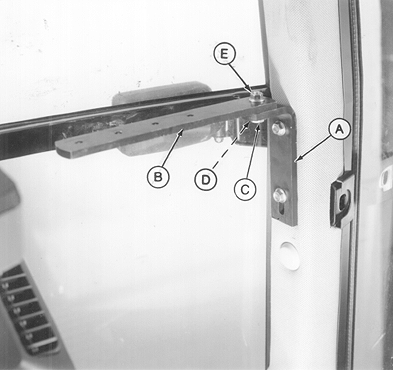
E38450-UN-25APR95A - Angle Bracket
B - Mounting Strap
C - Cap Screw, M10 x 35 mm
D - Washer
E - Flange Nut
Remove top two plugs from the lower right-hand front cab post. -
Attach angle bracket (A) to the corner post using M10 x 20 flange-head cap screws.
-
Attach the monitor-controller mounting strap (B) to the angle bracket (A) using cap screw (C), washer (D), and flange nut (E).
-
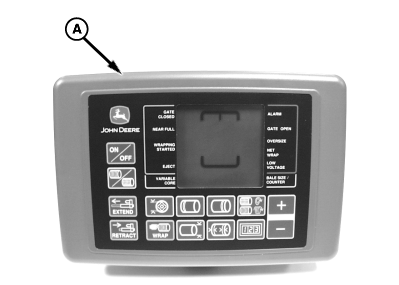
E52435-UN-16JUN03BaleTrak™ Pro Monitor-Controller
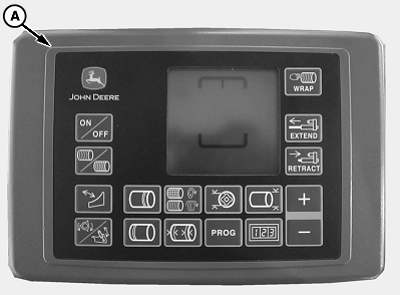
E84329-UN-06SEP17BaleTrak™ Plus Monitor-Controller
A - Monitor-Controller
Attach the pivot bracket on the monitor-controller (A) to the mounting strap using a M6 x 16 cap screw. -
Route the monitor-controller wiring harness along the right-hand side of the cab, away from operating levers, and toward the rear of the cab.
-
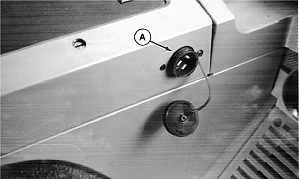
RW22076-UN-04DEC92John Deere 7000 Series Tractor
A - Convenience Outlet
Connect the power plug on the monitor-controller wiring harness to the convenience outlet (A). -
Route the harness through a grommet in the back of the cab, or drill a 44 mm (1-3/4 in) diameter hole in rear wall if necessary.
|
DP99999,0000DBB-19-20170915 |