Twine Arm Calibration (Channel 029)
-
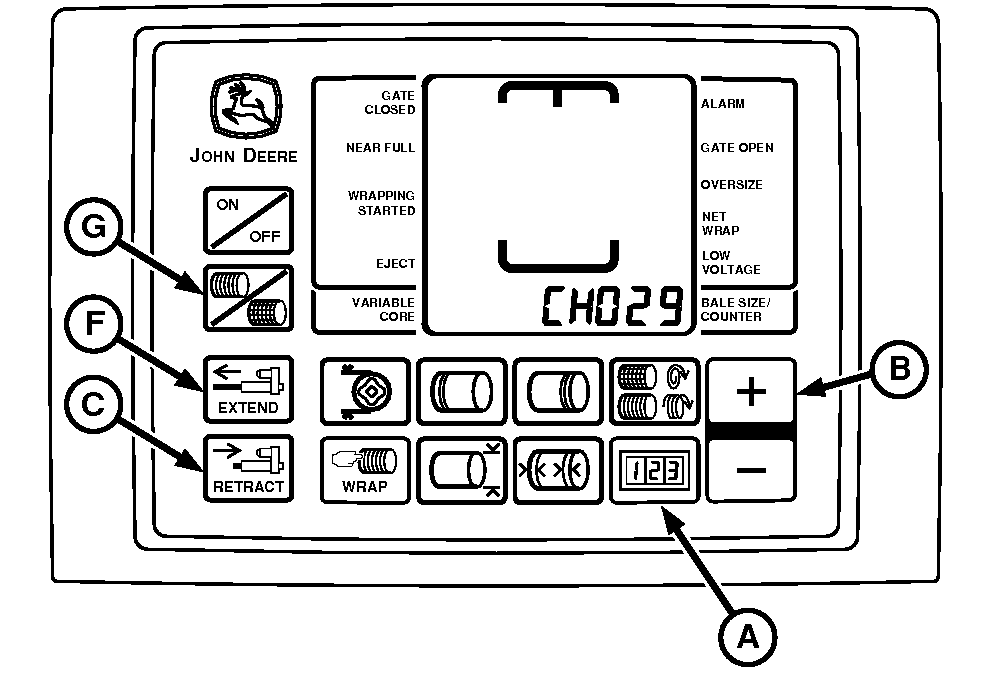
E52575-UN-10JUL03BaleTrak™ Pro Monitor
E52472-UN-19JUN03A - COUNTER Key
B - PLUS Key
C - RETRACT Key
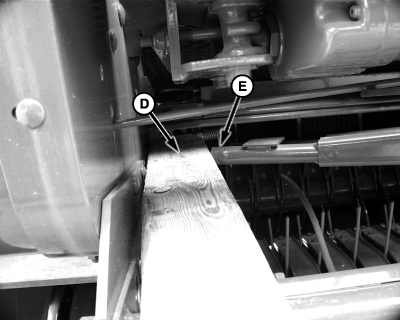
D - Wood Block
E - Twine Arm
F - EXTEND Key
G - TWINE or NET Key
Turn the tractor ignition key to the ON position. Do not start the tractor engine. Turn the monitor-controller ON. -
Briefly press the TWINE or NET key (G). Ensure that the monitor-controller is in the TWINE mode (indicator will briefly show on screen).
-
Turn the monitor-controller OFF.
-
Press and hold the COUNTER key (A) while turning the monitor ON.
-
Continue to hold the COUNTER key and press the PLUS key (B) until CH029 appears in the digital display. Release both keys.
-
Press and hold the RETRACT key (C) until the twine actuator fully retracts and the display reads zero.
-
89 mm equals 3-1/2 in, which is standard dimension for most 4 inch wide lumber, such as a 2 x 4 or 4 x 4.
Place an 89 mm (3-1/2 in) wood block (D) on the right-hand side of the bale chamber, so that the twine arm (E) contacts the wood block when the actuator is extended.
-
Press the EXTEND key (F) and extend the actuator until it stalls by contacting the wood block.
-
Enter the value displayed in to memory by pressing the PLUS and MINUS keys together and listening for two confirming beeps.
-
Press the RETRACT key (C) to release the wood block.
|
DP99999,0000DCB-19-20170920 |