Reset BaleTrak™ Pro or Plus Monitor-Controller to Initial Settings (Channel 001)
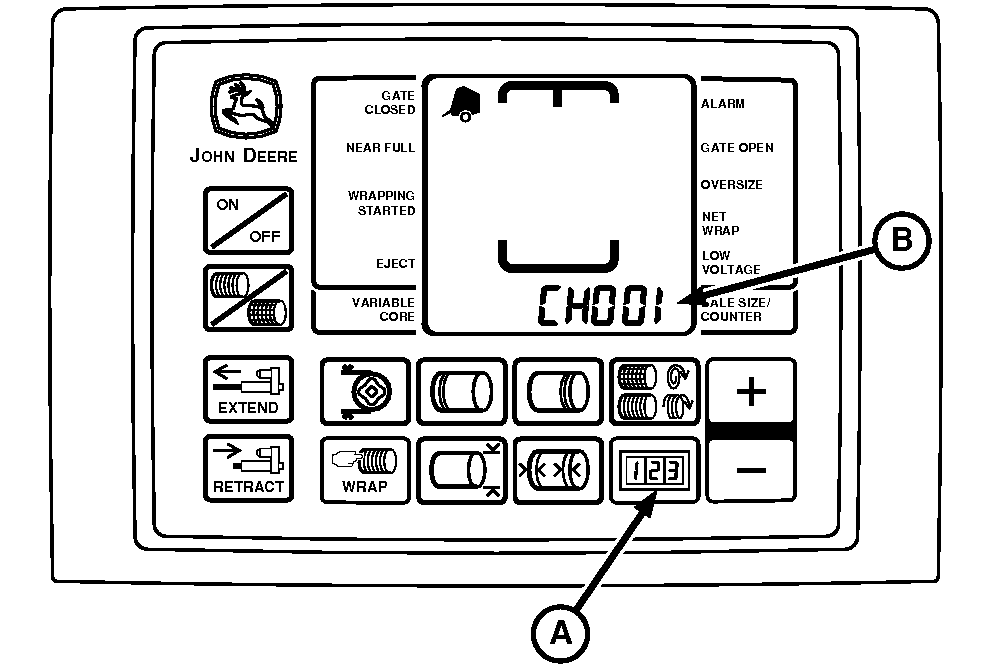
E52442-UN-18JUN03
A - COUNTER Key
B - CH 001 Displayed
All adjustable monitor-controller settings can be simultaneously reset to initial settings using the following procedure:-
Turn the tractor ignition key to the ON position. Do not start the tractor engine.
-
Press and hold the COUNTER key (A) while turning on the monitor.
-
Release the key; the digital display must show 050.
-
Simultaneously press and hold the PLUS and MINUS keys until the digital display changes from 050 to 099, then release the keys.
The display change is a visual indication that adjusted set points have reverted to initial settings. (See BaleTrak™ Pro and Plus Monitor-Controller Setup Values and Initial Settings, in this section, to see which settings are changed.)
-
Turn the monitor off to enter initial settings into memory.
- If in English units, the reset values are in English.
- If in metric units, the reset values are in metric.
-
Turn the tractor ignition key to the OFF position and remove the key.
|
BaleTrak is a trademark of Deere & Company |
DP99999,0000DD7-19-20170809 |