Adjust Net Wrap Feed Roll Pressure
-
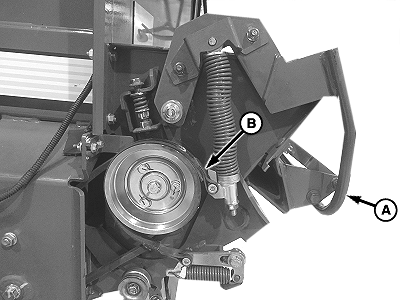
E83227-UN-23MAY17A - Brake Lever
B - Brake Band
Open the net wrap cover. -
Pull brake lever (A) out and up to rest on the latch tab and disengage the feed roll brake band (B).
-
Remove any foreign material or net wrap material from between the rolls.
-
Too much pressure can cause the net wrap material to wrap on the rubber roll. Too little pressure prevents the net wrap material from being fed to the bale or can cause poor placement of net wrap material on the bale.
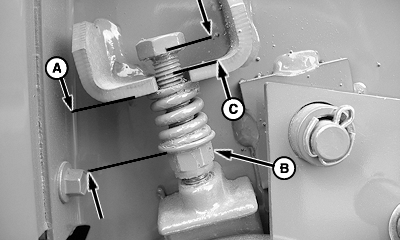
E57645-UN-14JUL09Left-hand Side Shown
A - Spring Length
B - Adjusting Nut
C - Distance, Bolt Head to Bracket
Adjust the spring length (A) by loosening or tightening the spring adjusting nut (B) until the spring length and the bolt head to bracket distance (C) are within specifications.Feed Roll Spring Distance Over Coils 20.5 mm (0.807 in) Bolt Head to Bracket Distance 1—12 mm (0.039—0.197 in) -
Engage the brake by pulling the lever out and down to rest under the latch tab.
-
Repeat on the opposite side.
|
DP99999,0000E05-19-20170824 |