Set Twine Spacing
Set Mechanical Twine Arm Spacing
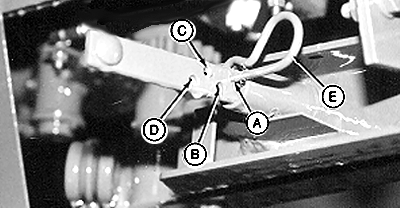
E38438-UN-19JUN96
A - 5 cm (2 in) Twine Arm Spacing
B - 10 cm (4 in) Twine Arm Spacing
C - 15 cm (6 in) Twine Arm Spacing
D - 20 cm (8 in) Twine Arm Spacing
E - Spring Pin
When the speed compensation program or the slip clutch alert system, if equipped, are enabled, the monitor-controller maintains consistent twine spacing for various bale diameters regardless of PTO speed. Without these features, mechanical spacing remains consistent, but spacing between the twine arms varies when operating at less than rated PTO speeds.
-
Set distance between the twine arms by installing spring pin (E) in the desired position:
Hole ID
Twine Arm Spacing
A
5 cm (2.0 in)
B
10 cm (4.0 in)
C
15 cm (6.0 in)
D
20 cm (8.0 in)
-
When operating at rated PTO speed, the twine spacing setting in the monitor-controller must be the same as the mechanical twine arm spacing.
-
When operating at less than rated PTO speed, set the twine spacing in the monitor-controller to a value less than the mechanical twine arm spacing. This setting can vary with different PTO speeds. Check the twine spacing on a bale and adjust the setting as necessary to get the desired twine spacing.
Set Monitor-Controller Twine Spacing
-
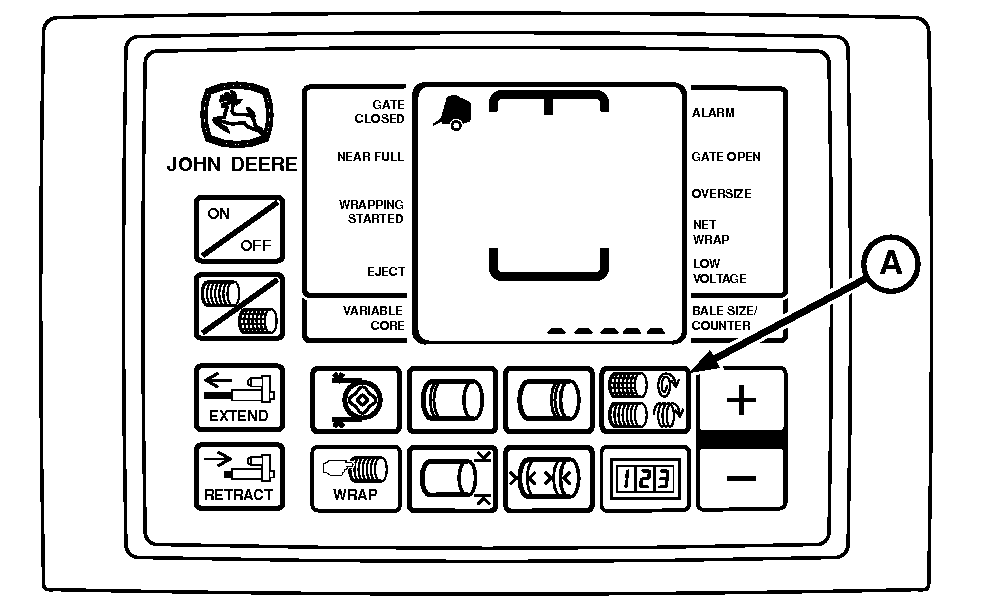
E84342-UN-30AUG17BaleTrak™ Pro Monitor
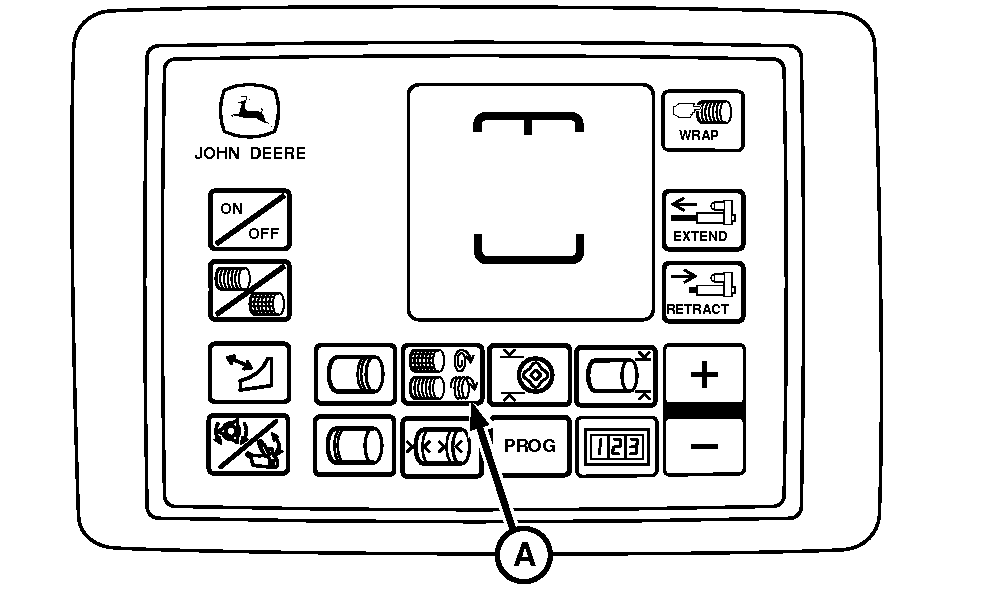
E84343-UN-30AUG17BaleTrak™ Plus Monitor
A - TWINE SPACING Key
Turn the tractor ignition key to the ON position. Do not start the tractor engine. Turn the monitor-controller ON. -
Press the TWINE SPACING key (A). Press the PLUS or MINUS keys until the desired twine spacing appears in the digital display. Use the following chart as a guideline. Monitor-controller settings can vary with crop conditions and between balers.
When the speed compensation program or the slip clutch alert system, if equipped, are enabled, the monitor-controller maintains consistent twine spacing for various bale diameters regardless of PTO speed. Without these features, mechanical spacing remains consistent, but spacing between the twine arms varies when operating at less than rated PTO speeds.
Engine rpm
Mechanical Setting
Monitor-Controller Setting
Rated Speed
10 cm (4.0 in)
10 cm (4.0 in)
1800 rpm
10 cm (4.0 in)
9 cm (3.5 in)
1500 rpm
10 cm (4.0 in)
8 cm (3.0 in)
1300 rpm
10 cm (4.0 in)
6 cm (2.5 in)
-
Six seconds after the last adjustment, the setting is entered into memory.
-
Turn the monitor-controller OFF. Turn the tractor key to the OFF position and remove the key.
|
DP99999,0000E0A-19-20171122 |