Test Oversize Bale Switch (Channel 013)
-
Turn the tractor ignition key to the ON position. Do not start the tractor engine.
-
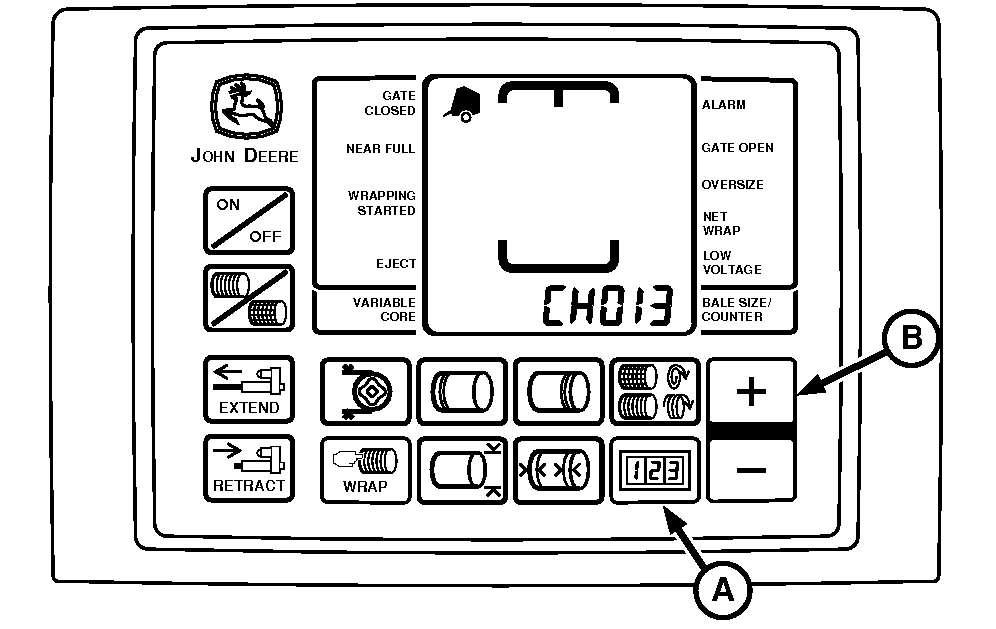
E52528-UN-31AUG17BaleTrak™ Pro Monitor

E84402-UN-31AUG17BaleTrak™ Plus Monitor
A - COUNTER Key
B - PLUS Key
Press and hold the COUNTER key (A) while turning the monitor-controller ON. -
Continue to hold the COUNTER key and press the PLUS key (B) until the digital display shows CH013.
-
Release the keys and view the reading on the display. Verify that the display reads 012.
-
Open the side door and depress the switch actuator. Verify that the display reads 00 and the alarm tone sounds.
-
Tension arm must be fully raised for oversize bale switch to be depressed.
Start the tractor engine. Using the SCV lever, raise the gate to full height.
-
Verify that the display reads 00 and the alarm tone sounds.
Diagnostic Channel
Function
Display Reading
Switch Open
Display Reading
Switch Closed
013
Oversize Bale Switch
012
00 (Tone)
-
If readings are not as shown, adjust switch position and test again. (See ADJUST OVERSIZE BALE SWITCH in Service-Baler section.)
-
If switch adjustment does not produce normal readings:
-
Turn the monitor-controller OFF. Turn the tractor key to the OFF position and remove the key.
-
Check the wire harness for cuts and breaks.
-
Check harness connectors for damaged (pushed back) terminals.
-
Check for correct wire connections. (See WIRE HARNESS DIAGRAM—BALER in Service—Baler section.)
-
Replace switch if necessary. (See your John Deere dealer or qualified service provider.)
-
|
DP99999,0000E0C-19-20170926 |