Wrapping Program Button (BaleTrak™ Plus Monitors Only)
The program button allows an operator to switch between different wrap settings depending on whether twine or net is selected. The five preset programs (1—5) provide the following settings for the selected wrapping mode:
|
Program Key |
||||||
|
Crop Type |
Program |
Twine |
Net |
|||
|
Number of Left-Hand End Wraps |
Twine Spacing |
Number of Right-Hand End Wraps |
End Wrap Distance |
Number of Net Wraps |
||
|
Silage |
1 |
4 |
5 |
4 |
8 |
2 |
|
Straw |
2 |
3 |
10 |
3 |
10 |
3 |
|
Hay |
3 |
2 |
5 |
2 |
8 |
2.5 |
|
Precut Silage |
4 |
3 |
2 |
3 |
8 |
3 |
|
Precut Hay |
5 |
2 |
15 |
2 |
8 |
2 |
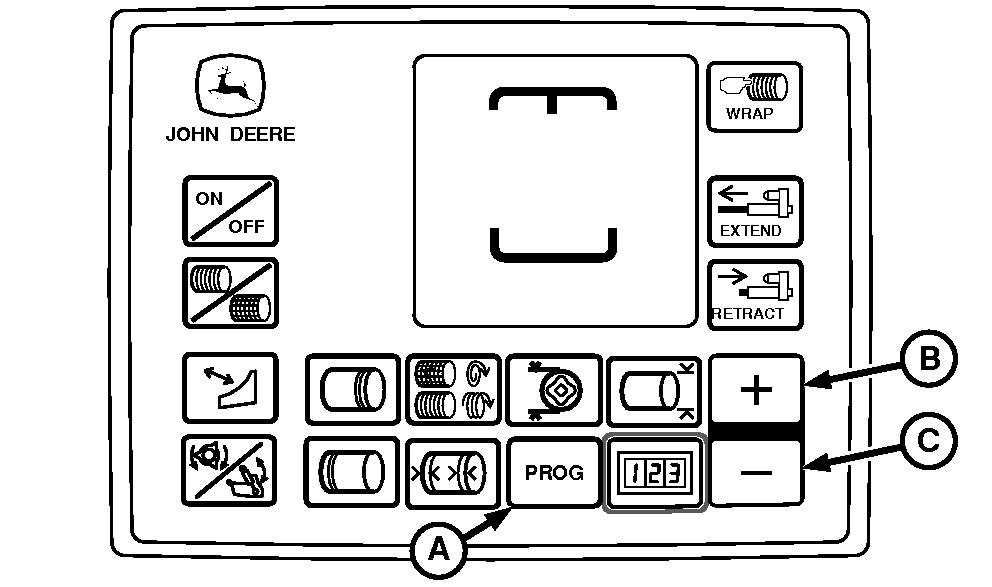
E84331-UN-06SEP17
BaleTrak Plus Monitor-Controller
A - PROG Key
B - PLUS Key
C - MINUS Key
Select the program number based off the desired twine or net settings shown in the table. To select the program desired, press the PROG key (A) and then the PLUS key (B) or MINUS key (C).|
DP99999,0000E21-19-20170912 |