Install Net Wrap Actuator
-
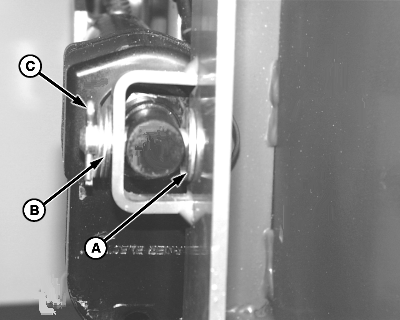
E48087-UN-12JUN00A - Washer, 13 x 25 x 3 mm
B - Washer, 13 x 25 x 3 mm (2 used)
C - Cotter Pin, 4 x 25 mm (2 used)
Install base end of actuator (motor down) on the right-hand side of the gate with a crowned pin (previously removed). Insert the pin through the inside hole in the actuator support, through washer (A), actuator, and second hole in the support. -
Install two washers (B) and cotter pin (C).
-
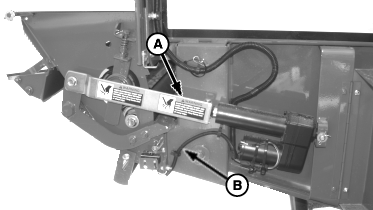
E54541-UN-01MAY06A - Link
B - Washer and Cotter Pin
Install link (A) over the rod end of the actuator as shown. Insert a crowned pin (previously removed) from the top through the link and the actuator rod. -
Install washer and cotter pin (B).
-
Connect the wire harness to the actuator. Fasten connector and harness to actuator motor with a tie strap.
-
Shut the actuator door.
-
After installing actuator, turn the monitor-controller ON. To return the counterknife arms to the home position, press the WRAP key. Turn the monitor-controller off to cancel the STOP alarm. If this procedure is not followed, net will be fed continuously during the next bale.
Connect the monitor-controller power plug to the power source. Turn the tractor ignition key to the ON position. Do not start the tractor engine. Turn the monitor-controller ON.
-
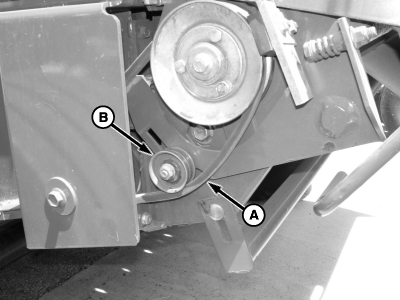
E55144-UN-10MAY07A - Belt
B - Idler Pulley
With channel 018 on monitor, cycle the actuator using the extend or retract key so the actuator moves just half way up or down, so belt (A) is loose. -
Temporarily move the V-belt from the top of the idler pulley (B) to the underside of the idler pulley.
-
Cycle the actuator several times using the WRAP key. Make sure that the actuator fully extends and fully retracts. If not, check for any binding at the mounting pins and washers. Clean electrical connections and check for low tractor voltage. There must be a minimum of 9.7 V with the tractor engine running and the net actuator installed.
-
Place the monitor on channel 018. Use the extend or retract key and return the actuator to approximately half way up or down.
-
Move the V-belt to top of idler pulley.
-
Using the extend or retract key, retract the actuator so the idler pulley does not have pressure on the belt.
-
Turn the monitor-controller OFF. Turn the tractor key to the OFF position and remove the key.
-
Check and adjust the net wrap V-belt idler tension. (See Check And Adjust Net Wrap V-Belt Idler Tension in this section.)
-
Check and adjust feed roll brake (See Check And Adjust Net Wrap Feed Roll Brake in this section.)
|
DP99999,0000E8C-19-20171127 |