Adjust Twine Arm-to-Starter Roll, Cutter Link Support, and Twine Arm Stop
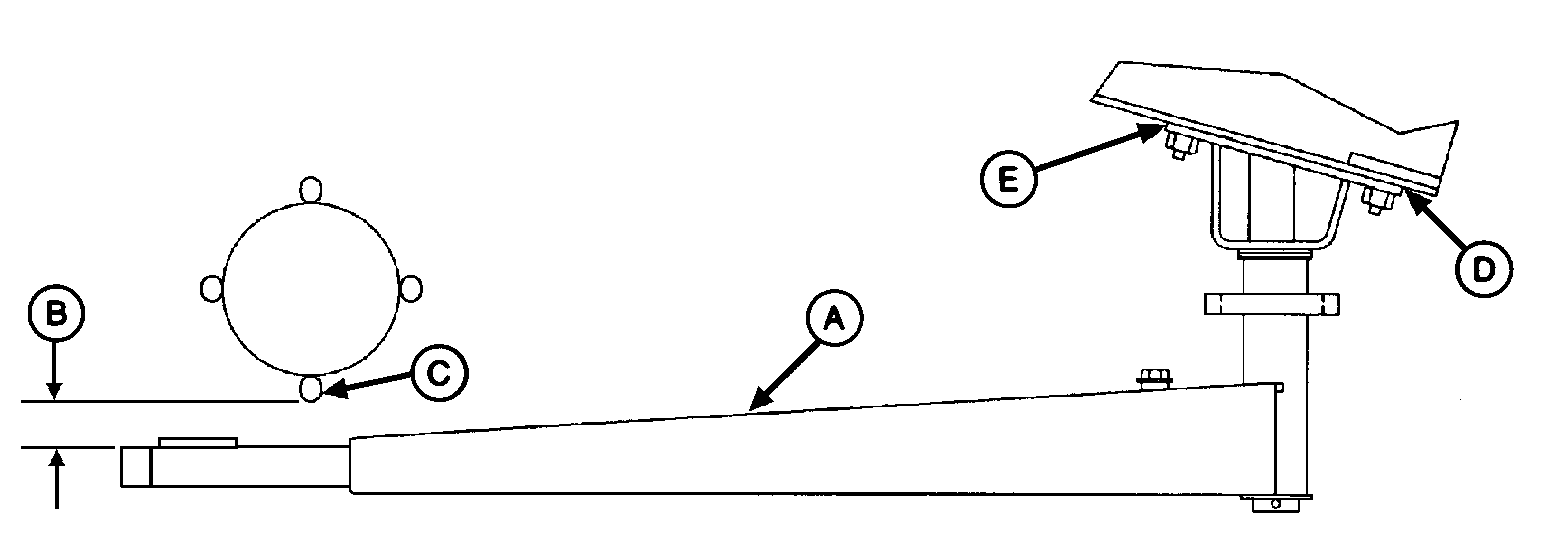
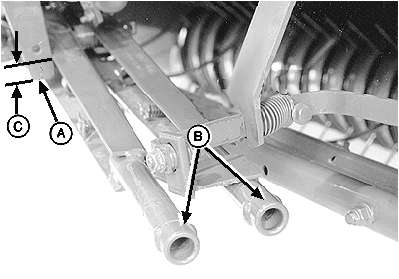
E40616-UN-16DEC97
A - Twine Arm
B - Dimension
C - Starter Roll Rod
D - Shim Location
E - Shim Location
 Twine arms can move unexpectedly when twine arm power
is on. Turn off power to twine arms when standing or placing hands
near twine arms.
Twine arms can move unexpectedly when twine arm power
is on. Turn off power to twine arms when standing or placing hands
near twine arms.
Twine knife has two cutting edges. Be careful when working around the knife. It is sharp.
Adding or removing shims located between the twine arm support and crossbeam will affect dimensions at the following locations:
-
Twine arm-to-starter roll:
- Twine arm pointing directly toward rear.
- Twine arm toward right side of baler.
- Twine arm toward left side of baler.
- Twine arm-to-cutter link support.
- Twine arm-to-twine arm stop.
Check dimensions at all locations before performing adjustments. Adding or removing shims at one location can change the dimension at another location.
-
Start tractor engine and raise gate fully.
-
Lower pickup so twine arms will not contact pickup teeth.
-
Shut off tractor engine and remove key. Lock the gate.
-
Remove lower drive roll chain so starter roll can be rotated by hand.
Adjust Twine Arm-to-Starter Roll
-
Turn tractor key to ON position. Do not start tractor engine. Press ON or OFF key to turn monitor-controller ON.
-
Press EXTEND key to move twine arms so rear twine arm (A) points toward rear of baler.
-
Turn monitor-controller OFF. Turn tractor key to OFF position. Remove key.
-
Rotate starter roll until starter roll rod (C) is closest to the twine arm tube.
-
By hand, remove end play at end of twine arm toward starter roll. Check dimension (B) between starter roll rod (C) and twine arm tube. Dimension (B) must be within specifications.
Starter Roll Rod-to-Twine Arm Tube Distance 6—12 mm (1/4—1/2 in.) -
If dimension (B) is less than specified:
-
Remove shims, as necessary, at location (D) between twine arm
support and crossbeam. Remove an equal number of shims at the right-hand
and left-hand mounting bolts. (One shim moves twine arm approximately
3 mm [1/8 in.].)
OR
- Add shims, as necessary, at location (E) between twine arm support and crossbeam. Add an equal number of shims at the right-hand and left-hand mounting bolts.
-
Remove shims, as necessary, at location (D) between twine arm
support and crossbeam. Remove an equal number of shims at the right-hand
and left-hand mounting bolts. (One shim moves twine arm approximately
3 mm [1/8 in.].)
-
If dimension (B) is more than specified:
-
Remove shims, as necessary, at location (E) between twine arm
support and crossbeam. Remove an equal number of shims at the right-hand
and left-hand mounting bolts. (One shim moves twine arm approximately
3 mm [1/8 in.].)
OR
- Add shims, as necessary, at location (D) between twine arm support and crossbeam.
-
Remove shims, as necessary, at location (E) between twine arm
support and crossbeam. Remove an equal number of shims at the right-hand
and left-hand mounting bolts. (One shim moves twine arm approximately
3 mm [1/8 in.].)
-
Turn tractor key to ON position. Do not start tractor engine. Turn monitor-controller ON.
-
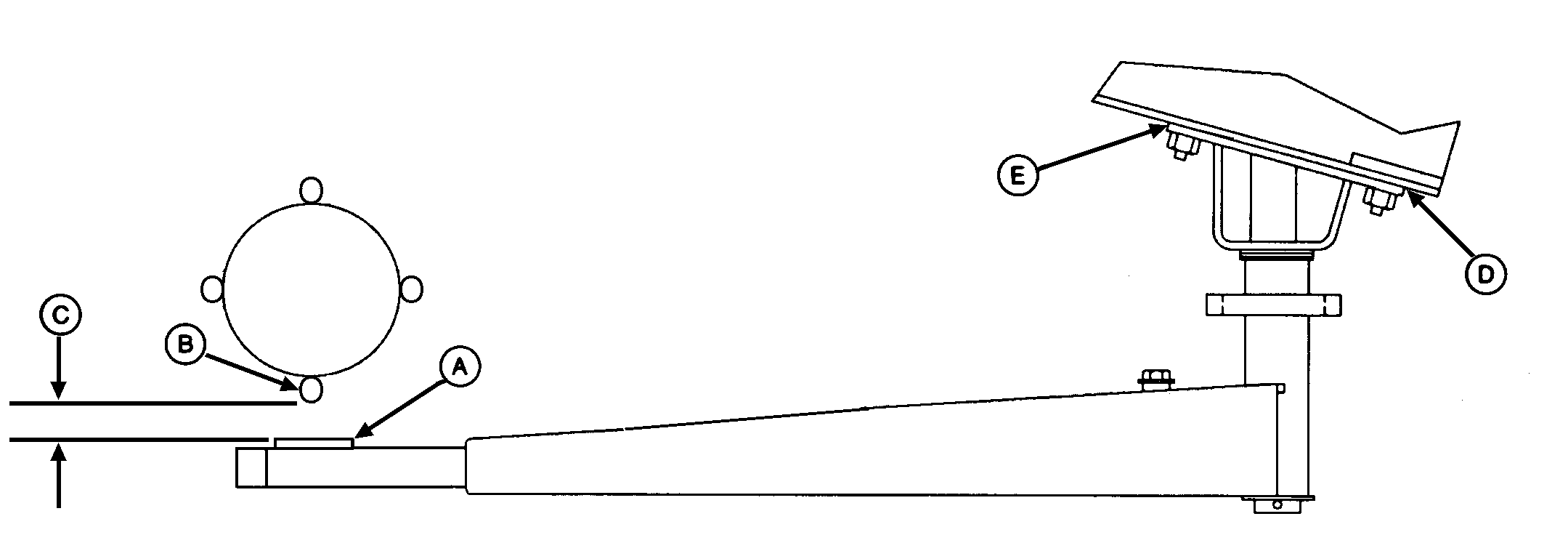
E41680-UN-31OCT96A - Strap
B - Starter Roll Rod
C - Dimension
D - Shim Location
E - Shim Location
Press monitor-controller EXTEND key to move twine arms to right of center so strap (A) is below starter roll rod (B). -
Turn monitor-controller OFF. Turn tractor key to OFF position. Remove key.
-
Rotate starter roll until starter roll rod (B) is closest to twine arm strap (A).
-
By hand, remove twine arm end play at end of twine arm toward starter roll.
-
Check dimension (C) between starter roll rod (B) and strap (A). Dimension (C) must be to specifications.
Starter Roll Rod-to-Strap Clearance (Minimum) 3 mm (1/8 in.) -
If dimension (C) is less than specified, add an equal number of shims at right-hand location (D and E), or remove an equal number of shims at left-hand location (D) and (E).
-
Turn tractor key to ON position. Turn monitor-controller ON.
-
Press monitor-controller RETRACT key to move twine arm left of center so strap (A) is below starter roll rod (B).
-
Turn monitor-controller OFF. Turn tractor key to OFF position. Remove key.
-
Rotate starter roll until starter roll rod (B) is closest to twine arm strap (A).
-
If dimension (C) is less than specified, add an equal number of shims at the left-hand locations (D) and (E), or remove an equal number of shims at the right-hand locations (D) and (E).
Adjust Twine Arm-to-Cutter Link Support
-
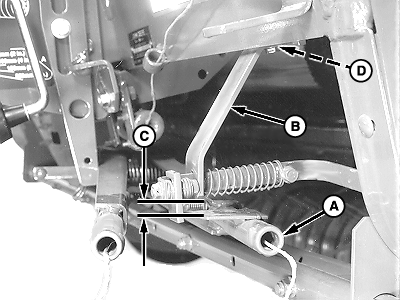
E40634-UN-06SEP00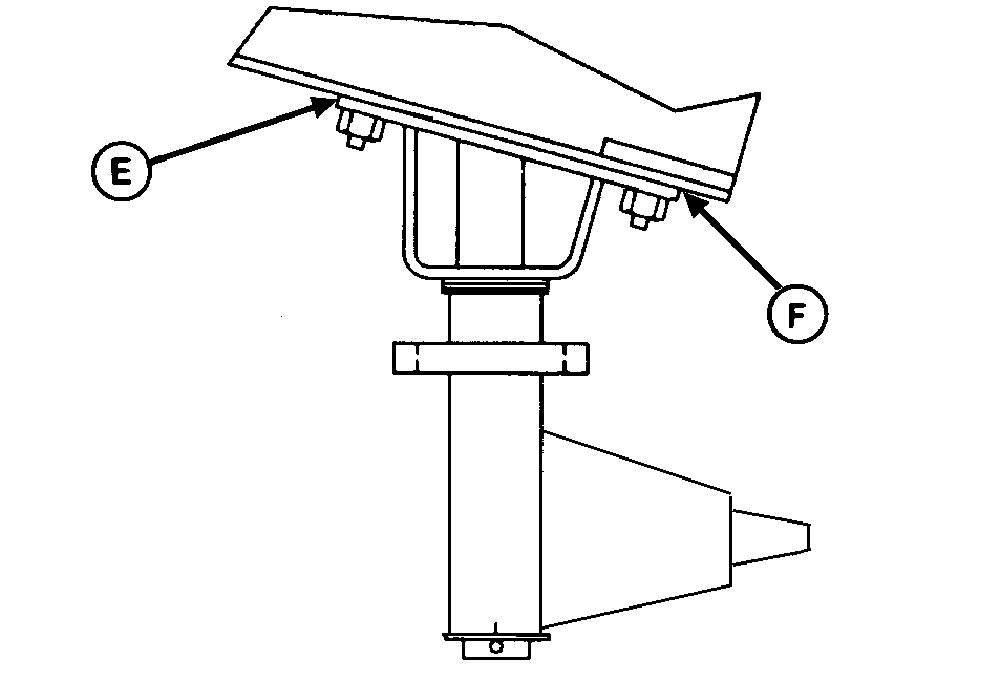
E41682-UN-24OCT96A - Twine Arm
B - Cutter Link Support
C - Dimension
D - Shim Location
E - Shim Location
F - Shim Location
Turn tractor key to ON position. Do not start tractor engine. Press ON or OFF key to turn monitor-controller ON. -
Press monitor-controller RETRACT key to move twine arms until twine arm (A) lightly contacts the cutter link contact tab.
-
Turn monitor-controller OFF. Turn tractor key to OFF position. Remove key.
-
Check dimension (C) between top of twine arm strap and bottom edge of cutter link support (B). Dimension (C) must be within specifications.
Top of Twine Arm Strap-to-Bottom Edge of Cutter Link Support Clearance 6 mm (1/4 in.) -
If dimension (C) is less than specified and no shims exist at location (D) between support (B) and crossbeam:
-
Add an equal number of shims between twine arm support and crossbeam
at left-hand locations (E) and (F).
OR
- Remove an equal number of shims between twine arm support and crossbeam at right-hand locations (E) and (F).
-
Add an equal number of shims between twine arm support and crossbeam
at left-hand locations (E) and (F).
Adjust Twine Arm-to-Twine Stop
-
E40623-UN-01JUL96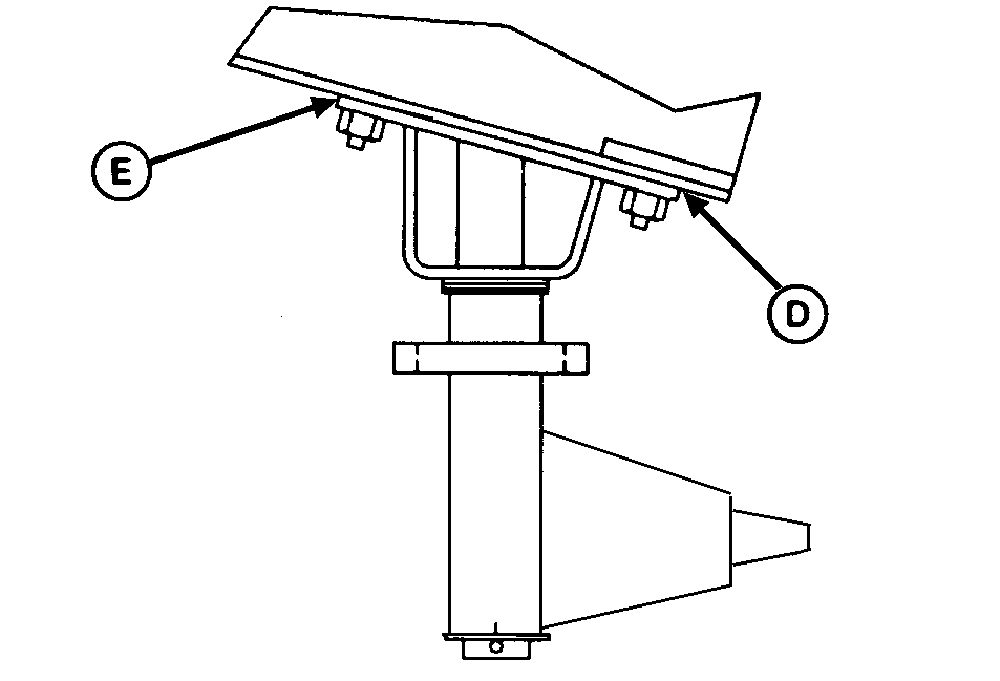
E40617-UN-07OCT96A - Twine Arm Stop
B - Twine Arms
C - Minimum Overlap
D - Shim Location
E - Shim Location
Make sure twine arm stop (A) is in the down position. -
Turn tractor key to ON position. Do not start tractor engine. Press ON or OFF key to turn monitor-controller ON.
-
Press monitor-controller RETRACT key to return twine arms (B) to home position.
-
Turn monitor-controller OFF. Turn tractor key to OFF position. Remove key.
-
Check overlap (C). There must be a minimum overlap between bottom of stop (A) and front twine arm surface to within specifications.
Bottom of Stop-to-Front Arm Surface Overlap 2 mm (3/32 in.) -
If dimension (C) is less than specified:
-
Add an equal number of shims at the right-hand locations (D)
and (E).
OR
- Remove an equal number of shims at the left-hand locations (D) and (E).
-
Add an equal number of shims at the right-hand locations (D)
and (E).
Check twine arm adjustments
-
Check clearances again between twine arm and starter roll, twine arm and cutter link support, and twine arm to twine arm stop. If twine arm to starter roll dimension has changed due to adjusting twine arm to cutter link support or twine arm stop, adjust shims between twine arm and crossbeam as needed.
-
Adjust twine cutter-to-twine arm. (See ADJUST TWINE CUTTER-TO-TWINE ARM in this section.)
-
Install lower drive roll chain.
-
Unlock and close gate.
|
PP98408,00010D1-19-20130709 |