Slip Clutch Alert (MegaWide™ Plus Pickup)
E52931-UN-12NOV03
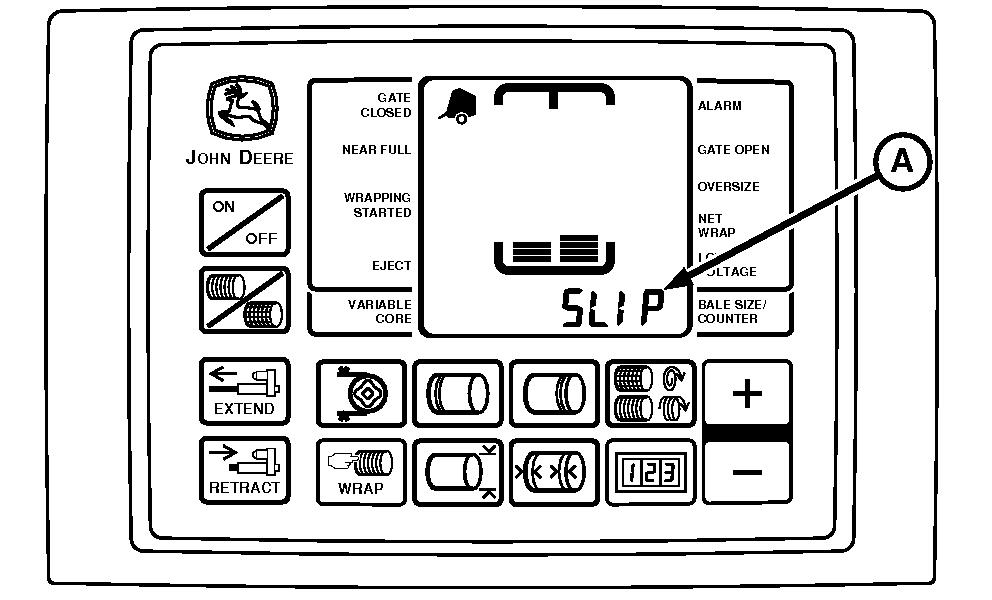
A - Digital Display
This system alerts the operator by an audible alarm. Also the word Slip appears in the digital display (A) when either the main PTO drive clutch or the pickup drive clutch slips.
Understanding Slip Clutch Alert System
E84491-UN-14SEP17
PTO Speed Sensor
E84492-UN-14SEP17
Lower Drive Roll Sensor
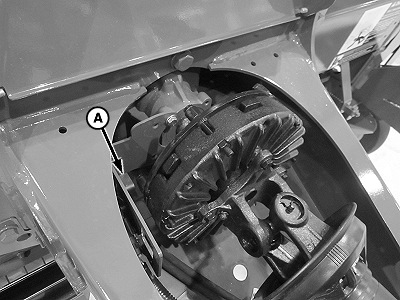
A - PTO Speed Sensor
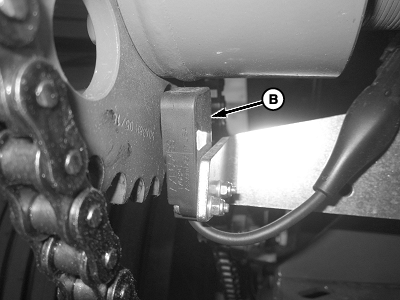
B - Speed Sensor, Lower Drive Roll
The PTO speed sensor (A) measures the input speed of the PTO driveline. The speed sensor (B) measures the output speed of the pickup slip clutch. The BaleTrak™ Pro or Plus monitor-controller compares these speeds. If the speed drops below 10 percent of the calculated operating speed for more than 1 second, the slip alarm is activated. The system informs the operator when either of the two clutches is slipping.
Speed Compensation of Twine or Net Wrap Application
The speed compensation program applies the desired twine spacing or number of net layers, regardless of PTO speed.
For example:
If the monitor-controller is set for 102 mm (4 in) twine spacing and wrapping is done at less than full PTO speed, 102 mm (4 in) twine spacing is maintained.
If the monitor-controller is set for two net layers and the twine or net application is done at less than full PTO speed, the two net layers are maintained.
The PTO driveline sensor (A) must be activated within the monitor-controller for proper operation of the speed compensation program. (See Net Wrap, Slip Clutch Alert, and Variable Core Features [Turning ON and OFF] in the Service—BaleTrak™ Pro and Plus System section.)
Turning PTO Speed Sensor ON and OFF:
- PTO speed sensor can be turned OFF or ON by accessing channel 204.
- Feature can be turned ON by changing value to 540 rpm or 1000 rpm, depending on the baler configuration.
- Entire slip clutch alert feature can be turned OFF by changing value to 0.
Turning Pickup Speed Sensor ON and OFF:
- Pickup rpm sensor can be turned OFF and ON by accessing channel 205.
- Feature can be turned ON by changing value to 310 rpm.
- Pickup rpm sensor can be turned OFF by changing value to 0.
- Turning OFF the pickup sensor on channel 205 and turning ON the PTO sensor on channel 204 still allows automatic speed compensation during the twine or net application cycle.
|
BaleTrak is a trademark of Deere & Company |
SF04007,0000F2B-19-20171122 |