Operate Precutter Knives—450M Only (If Equipped)
Engage Knives
-
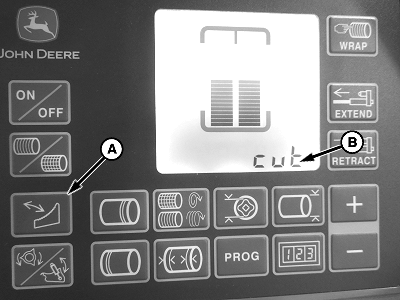
E82217-UN-14FEB17A - Knife Icon
B - Cut
Raise the precutter floor. -
Press the knife icon (A) on the display.
-
To engage the knives, operate the pickup SCV lever.
-
When the knives are engaged, “cut” (B) appears on the display.
-
To return to the main baling screen, press the knife icon.
Disengage Knives
-
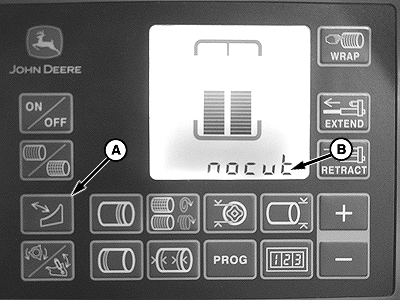
E82218-UN-14FEB17A - Knife Icon
B - “nocut”
Press the knife icon (A) on the display. -
To disengage the knives, operate the pickup SCV lever.
-
When the knives are disengaged, “nocut” (B) appears on the display.
-
To return to the main baling screen, press the knife icon.
If the knives are engaged a ‘c” is displayed next to the current bale diameter on the main baling screen as an indicator.
After the knives are raised and returning to the main baling screen, the pickup can raise slightly. Monitor frequently and lower pickup when necessary. To help the pickup follow the field terrain, it is recommended to operate the pickup SCV in the float setting.
|
GW44282,0000750-19-20170809 |