Slip Clutch Alert PTO Speed Sensor
(Channel 204) (Turning
On and Off)
The following procedure is not used on a 450M and 550M Baler with a Regular pickup.
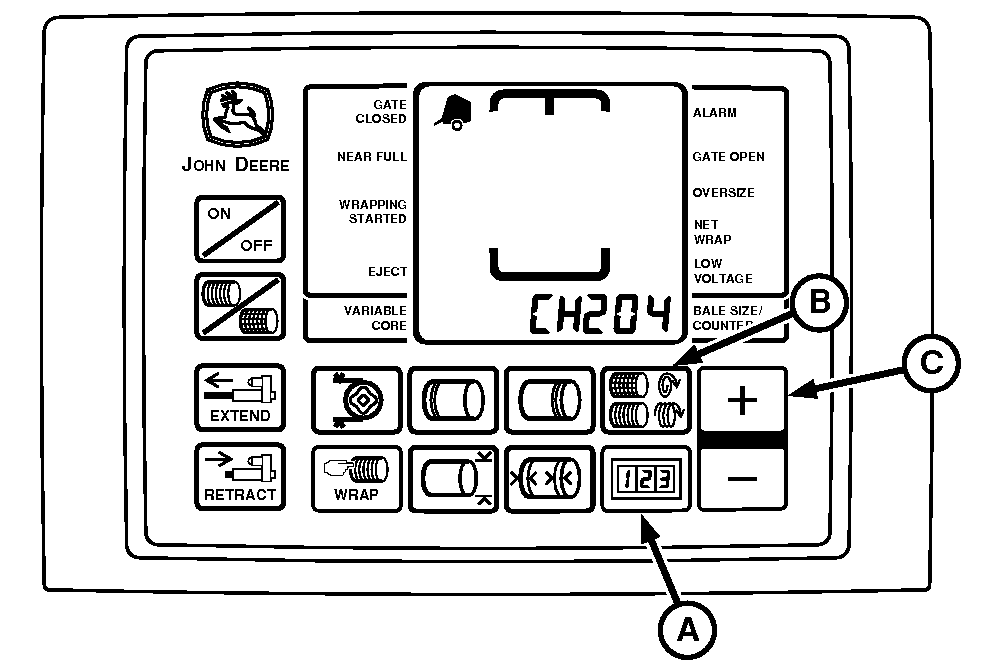
E55069-UN-25APR07
BaleTrak™ Pro Monitor-Controller Shown
A - COUNTER Key
B - NUMBER OF WRAPS Key
C - PLUS Key
PTO speed sensor can be turned OFF or ON by accessing channel 204.
Entire slip clutch alert feature can be turned off by changing value to 0.
Both channels 204 and 205 must be turned ON to use the slip clutch alert feature.
Turning Feature On and Off:
-
Turn tractor key to ON position. Do not start the tractor.
-
Press and hold both COUNTER key (A) and NUMBER OF WRAPS key (B) for the BaleTrak™ Pro or the COUNTER key and the BALE SIZE key for the BaleTrak™ Plus while turning the monitor-controller to ON. CH201 must be displayed.
-
Release both keys. Baler model is displayed.
-
Press and hold COUNTER key (A) and press the PLUS key (C) until CH204 is shown in display.
-
Release COUNTER key (A).
-
To turn PTO speed sensor ON, press PLUS key (C) until the correct PTO speed is shown in the display, either 540 rpm or 1000 rpm. To turn PTO sensor OFF, press the PLUS key (C) until 0 value is displayed.
-
Release PLUS key (C).
-
To enter the setting into memory, turn the monitor-controller OFF.
-
Turn monitor-controller ON to verify baler model number. Model number is displayed for approximately 2 seconds. If displayed baler model is incorrect, see Baler Model Program (Channel 201) in this section.
-
Turn tractor key to OFF position and remove key.
|
BaleTrak is a trademark of Deere & Company |
SF04007,0000E4E-19-20170914 |