Adjust Twine Arm Distance from Right Side Sheet —(450M) (Electric)
-
Do not operate twine arms with the pickup in raised position or damage to pickup teeth can occur.
The twine cutter tension must be adjusted first before performing this procedure.
For 550M balers, the right-hand twine guide controls twine distance from the right end of bale. The following adjustment procedure does not apply to these balers.
Lower pickup.
-
Turn tractor key to ON position. Do not start tractor engine.
-
Turn monitor-controller ON.
-
Move twine arms all the way to right-hand side of baler using monitor-controller EXTEND key.
-
Turn monitor-controller OFF. Turn tractor key to OFF position. Remove key.
-
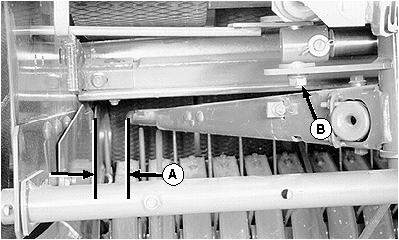
E39282-UN-19JUN96A - Twine Arm Distance
B - Nut
Measure side sheet to the twine arm distance (A). Distance must be within specifications with actuator fully extended and twine arm end play removed toward the rear.Twine Arm-to-Right Side Sheet (Electric) Distance 83—133 mm (3-1/4—5-1/4 in) -
To adjust, loosen the nut (B) enough so twine arms can be moved by hand, but with some resistance.
-
Move twine arms toward the side sheet as far as possible, then move twine arms to the rear to obtain recommended distance (A).
-
Tighten nut (B) enough to hold actuator bolt in position on the twine arm when twine arm is moved to home position.
-
Turn tractor key to ON position. Do not start tractor engine.
-
Turn monitor-controller ON.
-
Move twine arms to the home position (actuator fully retracted) using monitor-controller RETRACTED key.
-
Set monitor-controller selector switch to OFF (centered) position. Turn tractor key to OFF position. Remove key.
-
Tighten nut (B) to specifications with twine arms in home position.
Actuator Nut Torque 95 N·m (70 lb·ft) -
Repeat steps 3—6 to confirm correct distance from right-hand end of bale. Repeat steps 7—13 as necessary.
-
Adjust twine cutter tension. (See Adjust Twine Cutter Tension in this section.)
|
SF04007,0000E75-19-20170807 |