Adjust Net Wrap Delay (Channel 006)
E52524-UN-26JUN03
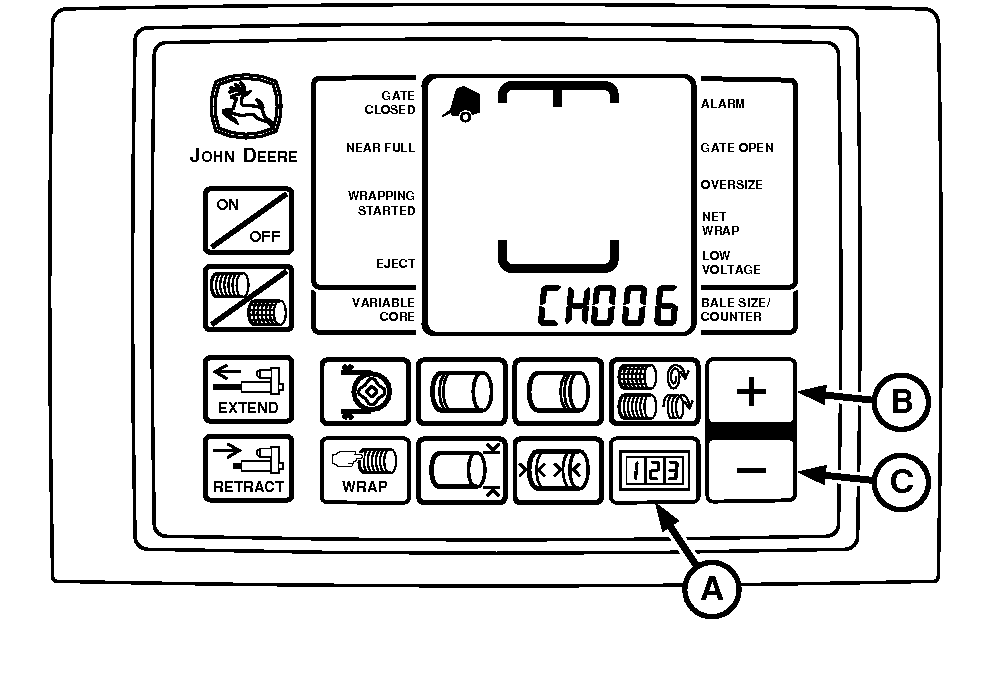
A - COUNTER Key
B - PLUS Key
C - MINUS Key
The initial setting for net wrap delay is 2 seconds. This provides time to stop forward travel and avoid getting crop between layers of wrap.If the operation requires additional delay before the twine or net application starts, such as operating on a hillside or baling at high ground speed, net wrap delay can be adjusted 0—8 seconds.
To Change Setting:
-
Turn tractor key to ON position. Do not start tractor engine.
-
Press and hold COUNTER key (A) while turning monitor-controller ON.
-
Continue to hold COUNTER key and press PLUS key until CH006 appears in digital display.
-
Release COUNTER key and view current setting.
-
To change the net wrap delay to the desired setting (0—8 seconds), use the PLUS (B) and MINUS keys (C).
-
To enter the setting into memory, turn the monitor-controller OFF.
-
Turn tractor key to OFF position. Remove key.
|
SF04007,0000F2F-19-20170807 |