Set Near-Full Indicator Set Point (Channel 010)
E52455-UN-18JUN03
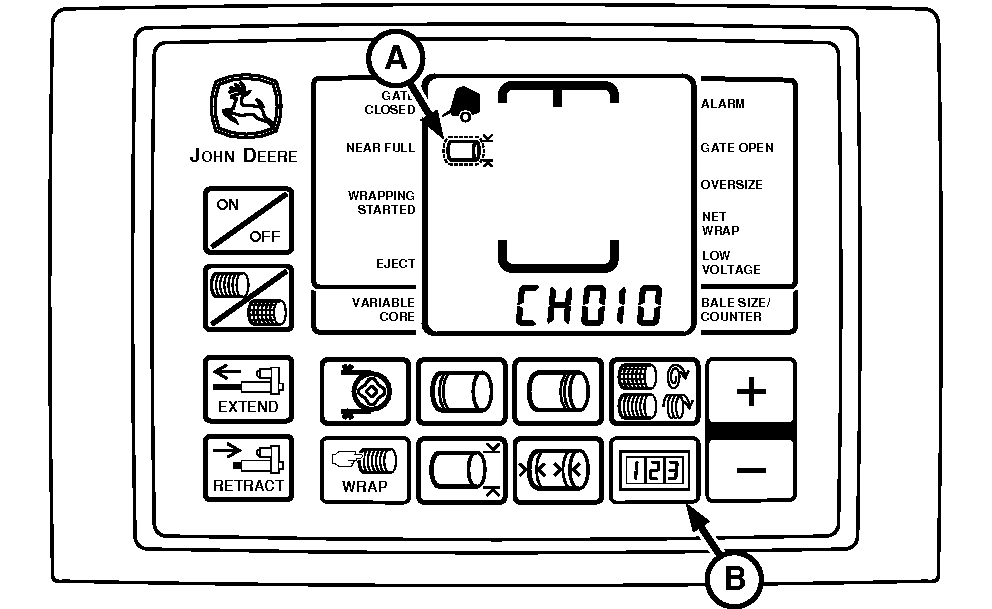
A - Near-Full Indicator
B - COUNTER Key
Near-Full indicator (A) informs operator when the bale has almost reached the desired size, based on the bale diameter setting. The point below the diameter setting, at which the indicator comes on, is adjustable between 1—27 cm (0.5—10.0 in), in 1 cm (0.5 in) increments.Initial setting is 11 cm (4.5 in).
If bale diameter is set at 183 cm (72 in) and the near-full distance is left at initial setting of 11 cm (4.5 in), the near-full indicator comes on when bale diameter reaches 172 cm (67.5 in).
If the bale diameter setting is changed, only change the near-full indicator set point if a different near-full distance is desired.
To Change Near-Full Indicator Set Point:
-
Turn tractor key to ON position. Do not start tractor engine.
-
Press and hold COUNTER key (B) while turning monitor-controller ON.
-
Continue to hold COUNTER key (B) and press PLUS key until CH010 appears in digital display.
-
Release COUNTER key and view current near full setting 1—27 cm (0.5—10.0 in).
-
Increasing near-full distance to highest setting of 27 cm (10.0 in) provides maximum time between near-full indication and the twine or net application cycle.
Decreasing near full distance to lowest setting of 1 cm (0.5 in) minimizes the time between the Near-Full indication and the twine or net application cycle.
Use PLUS and MINUS keys to change near-full distance to desired setting.
-
To enter the setting into memory, turn the monitor-controller OFF.
-
Turn tractor key to OFF position. Remove key.
|
SF04007,0000F30-19-20170914 |