Check PTO and Lower Drive Roll Speed (Channels 016 and 017)
The following procedure is not used on a 450M and 550M Baler with a Regular pickup.
Use speed readouts to verify operation and adjustment of sensors. Access channel 016 on monitor-controller for PTO speed and channel 017 for pickup drive speed.
-
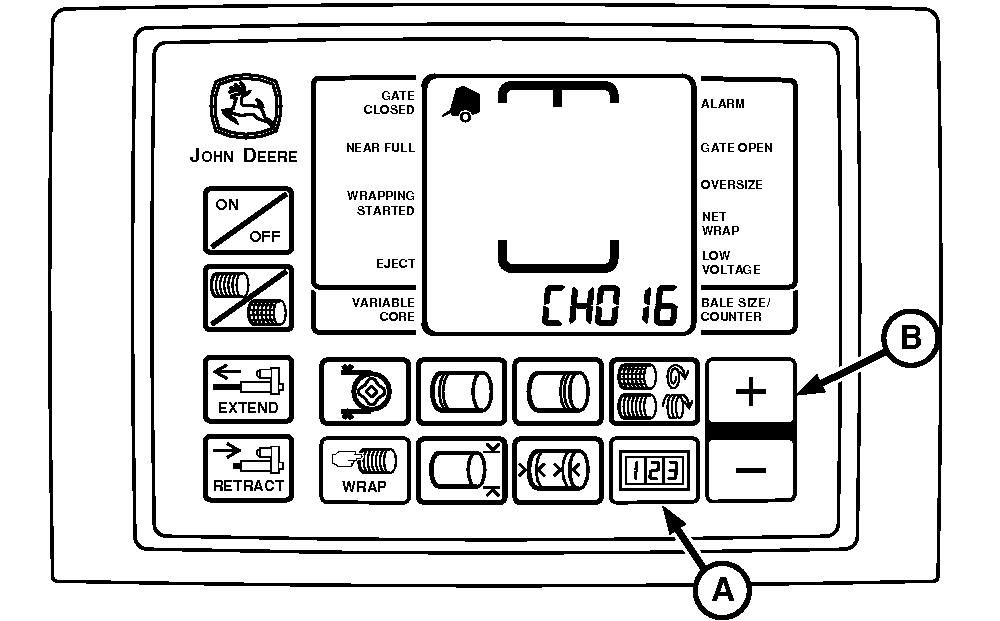
E57907-UN-24AUG09A - COUNTER Key
B - PLUS Key
Start tractor and operate engine at a low idle. Engage PTO. -
Press and hold COUNTER key (A) while turning monitor-controller ON.
-
Continue to hold COUNTER key (A) and press PLUS key (B) until CH016 appears in digital display.
-
Release COUNTER key (A) and PTO speed is displayed. Speed readout must be stable and not vary by ± 5 rpm.
-
Press and hold COUNTER key (A) and press PLUS key (B) until CH017 appears in digital display.
-
Release COUNTER key (A) and pickup drive speed is displayed. Speed must be stable and not vary by ± 5 rpm.
-
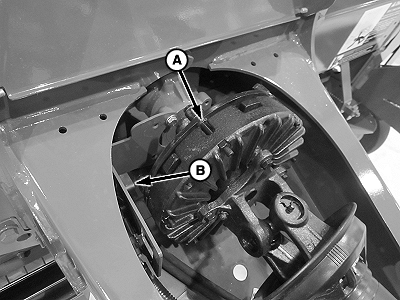
E83882-UN-14AUG17PTO Sensor
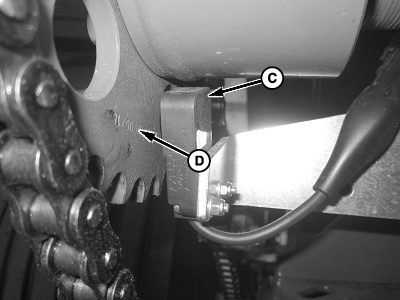
E83883-UN-14AUG17Lower Drive Roll (Pickup) Shown
A - PTO Sensor
B - Clutch Bushing or Lobe (6 used)
C - Pickup Sensor
D - Sprocket
If speed variation exceeds ± 5 rpm, shut off the tractor engine and remove key.The brackets for the PTO and pickup speed sensors do not have adjustments. Ensure that the PTO sensor (A) is 3—8 mm (.118—.315 in) from the clutch bushing or lobe (B). Ensure that the pickup sensor (C) is 3—8 mm (.118—.315 in) from the sprocket (D) and aligned with the passing holes in the sprocket.
When the tractor is operated at rated PTO speed, channel 016 must display 540 rpm for the 540 option and 1000 rpm for the 1000 option. Channel 017 must display approximately 310 rpm for the MegaWide™ pickups and 170 rpm for the HC2 feed system. Slip clutch alert system must be activated within the monitor-controller for proper operation.
Turning PTO Speed Sensor ON and OFF:
- PTO speed sensor can be turned OFF or ON by accessing channel 204.
- Feature can be turned ON by changing value to 540 rpm for the 540 option and 1000 rpm for the 1000 option.
- Entire slip clutch alert feature can be turned OFF by changing value to 0.
Turning Pickup Speed Sensor ON and OFF:
- Pickup rpm sensor can be turned OFF and ON by accessing channel 205.
- Feature can be turned ON by changing value to 310 rpm for the MegaWide™ or 170 for the HC2 feed system.
- Pickup rpm sensor can be turned OFF by changing value to 0.
- Turning OFF the pickup sensor on channel 205 and turning ON PTO sensor on channel 204 still allows automatic speed compensation during the twine or net application cycle.
|
MegaWide is a trademark of Deere & Company |
SF04007,0000F31-19-20170828 |