BaleTrak™ Pro and Plus Monitor-Controller Operation
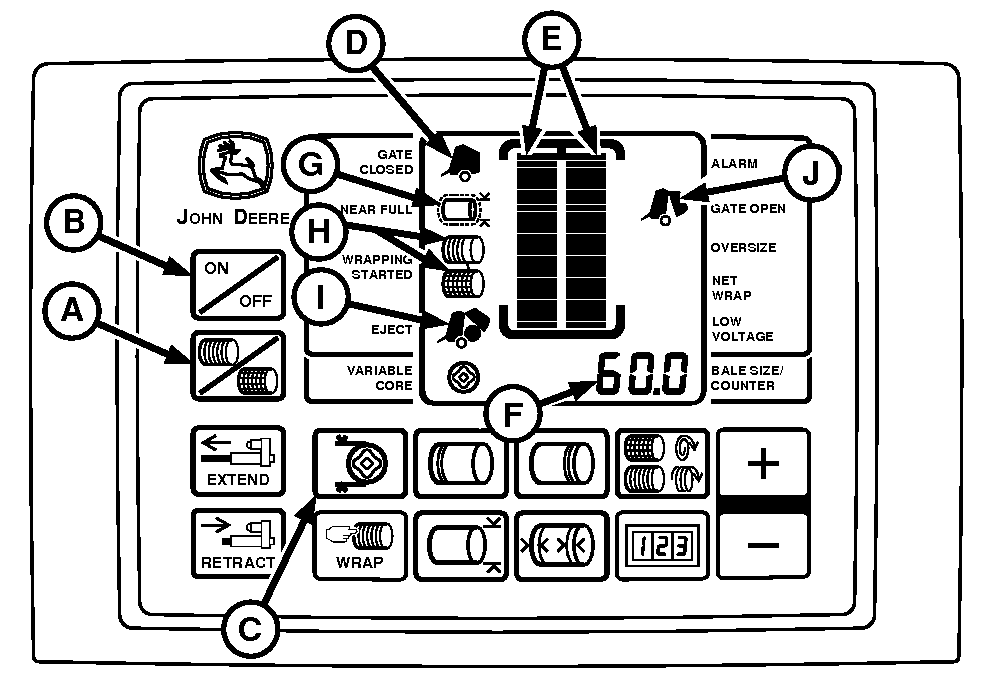
E84056-UN-11AUG17
BaleTrak™ Pro Monitor-Controller
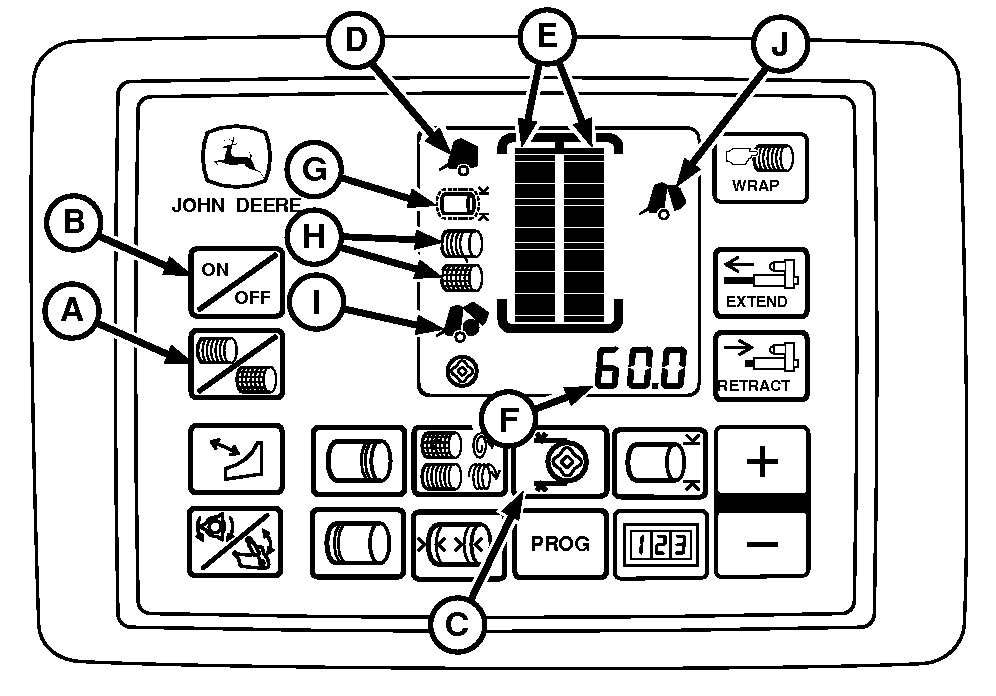
E84057-UN-29AUG17
BaleTrak™ Plus Monitor-Controller
A - Twine or Net Switch
B - ON or OFF Switch
C - Variable Core Key
D - Gate Closed Indicator
E - Bale Shape Bars
F - Digital Display
G - Near Full Indicator
H - Wrapping Started Indicator
I - Eject Indicator
J - Gate Open Indicator
Turn tractor key to ON position. Turn on monitor by pressing the on or off switch (B). Twine or net operation symbol is briefly displayed. Press and hold twine or net switch (A) for 3 seconds to switch between net and twine. Desired icon is displayed and two audible beeps confirm that change has been made.Both bale shape bars read low when the baler is empty.
Gate Closed (D) must be ON, indicating the gate is latched and ready to bale.
Bars (E) indicate bale shape. Bale shape bars in the green zone indicate tight belts and bale shape bars in the red zone indicate slack belts. For best bale shape, bars are in the green zone on both sides.
Bars read low while variable core valve is activated, until bale diameter grows larger than variable core diameter setting on monitor.
Digital display (F) shows bale diameter increasing in 1 cm (0.50 in) increments within display range of 77—160 cm (30.5—63 in).
The Near Full indicator (G) flashes and beeps twice when the bale reaches a diameter that is equal to the value set in Channel 10 (smaller than the preset bale diameter). Gives a chance to fill the bale ends properly—bars in the green zone.
Wrapping Started indicator (H) (Twine or Net) lights, beep, and net or twine application starts automatically when the bale reaches diameter setting. Stop travel and maintain engine speed at rated PTO during wrap and ejection cycle. When wrapping with twine, observe twine arm pointer and twine pulleys on the baler for proper operation. When the twine application is completed and actuator returns to the home position, Eject indicator (I) lights and stays on until the gate is opened.
When applying net to the bale, net application and cut-off are complete. The Eject indicator (I) displays and stays on until the gate is opened.
When applying B-Wrap to the bale, the application and the cut-off of material are completed and indicated automatically. Operator must disengage PTO when indicated by monitor to orient bale correctly during ejection. (See Monitor Display for B-Wrap Bales is this section for more information.)
Confirm that twine has been cut by observing twine pulleys. Back up (if not equipped with the bale ramp). Eject bale using hydraulic multi-function lever. Gate Open indicator (J) lights during normal ejection.
Gate Open indicator goes out and the Gate Closed indicator comes on indicating normal operations can continue.
A wrap and gate open cycle adds one bale to both the total and the resettable bale counters. The resettable counter is automatically displayed for 8 seconds when a bale is added.
If equipped with a variable core solenoid valve; Depress optional Variable Core key (C) if a soft core is desired. Variable core indicator lights when optional variable core feature is selected. Solenoid valve must be installed for the indicator to light.
|
SF04007,0000F4C-19-20170914 |