Test Tractor Convenience Outlet Voltage (Channel 019)
To determine if the convenience outlet provides adequate power to the BaleTrak™ Pro or Plus systems, complete the following check:
-
Remove the roll of net wrap material from the baler if testing the net actuator voltage. If the PTO is engaged with the net actuator extended, the net feeds into the empty baler and causes damage to the pickup or rotary feed system.
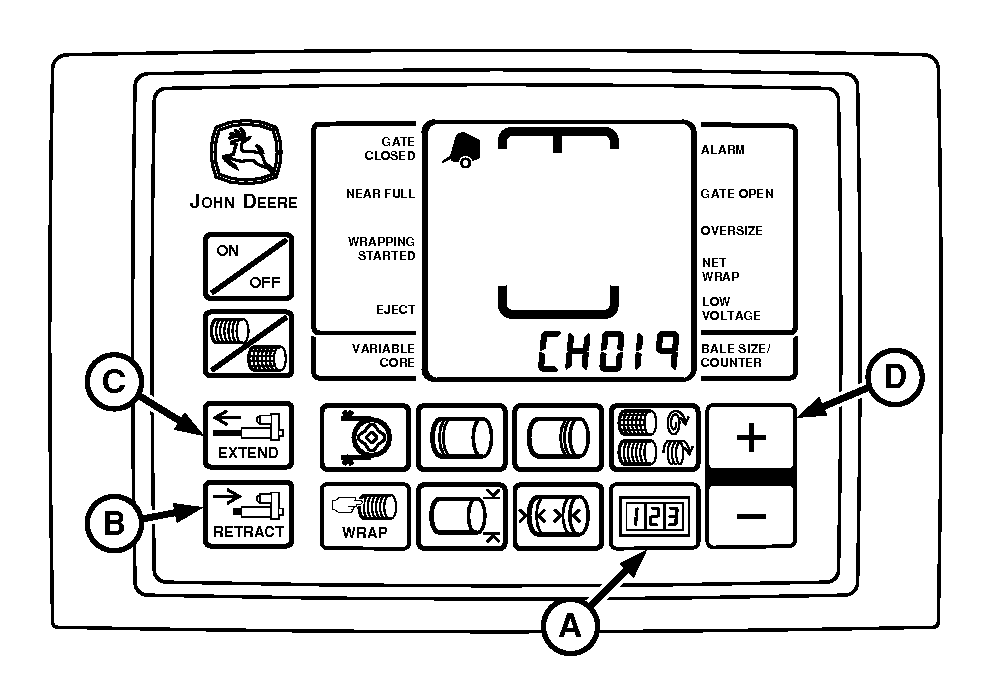
E52521-UN-26JUN03A - COUNTER Key
B - RETRACT Key
C - EXTEND Key
D - PLUS Key
If testing the net wrap actuator current, remove the roll of net wrap material from the baler. -
Start tractor engine.
-
Press and hold COUNTER key (A) while turning monitor-controller ON.
-
Continue to hold COUNTER key (A) and press PLUS key (D) until CH019 appears in the digital display.
-
Release COUNTER key (A) and view voltage readout.
-
Using the EXTEND key (C), extend twine or net actuator slightly.
-
Push and hold RETRACT key (B) until actuator stalls out in the fully retracted position. Note voltage displayed during first 4 seconds after stalling.
Convenience Outlet Voltage (Minimum) 9.7 V -
If voltage is less than specifications, install Convenience Outlet Kit. Only this kit must be used to provide a convenience outlet due to the wire size, lack of splices, and a 30 A circuit breaker. When installing this kit, attach power and ground wires directly to battery terminal clamp bolts only. (See Tractor Convenience Outlet in Preparing the Tractor section.)
 Convenience outlet is wired directly to battery. Turning
off the tractor key does not disconnect power to monitor.
Convenience outlet is wired directly to battery. Turning
off the tractor key does not disconnect power to monitor. -
Turn the monitor-controller OFF. Turn off tractor engine and remove key.
Disconnect the power cord to the monitor when working around the knife arm. Turning off tractor key does not turn off power to the monitor.
|
BaleTrak is a trademark of Deere & Company |
SF04007,0000F54-19-20170823 |