Attach Baler to Tractor Drawbar
-
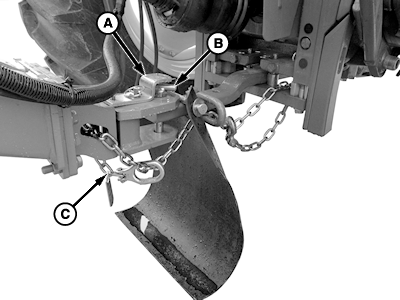
E61064-UN-30MAR12A - Bracket
B - Hitch Pin
C - Safety Chain
Remove quick-lock pin, raise, and rotate bracket (A) 90°. Remove hitch pin (B). -
Back up the tractor to baler. Align tractor drawbar with the front of the baler tongue.
-
Engage tractor park brake and place transmission in Park.
-
Shut off engine and remove ignition key.
-
Install hitch pin. Raise and rotate bracket (A) over hitch pin. Install quick-lock pin.
-
Route safety chain (C) through the loop on drawbar (if equipped) and connect to tractor drawbar supporting structure, as shown. Do not fasten to drawbar. Remove all slack except what is needed for turns.
-
Connect PTO driveline. (See Connect PTO Driveline in this section.)
-
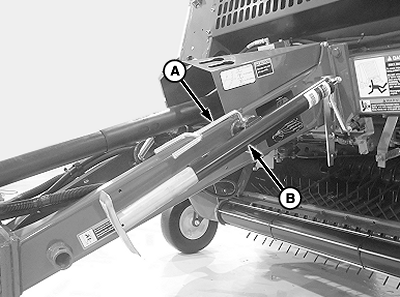
E83606-UN-07JUL17A - PTO Support
B - Jackstand
To remove the load off the jackstand, turn the handle. -
Remove quick-lock pin, PTO support (A), and jackstand (B).
-
Store jackstand (B) with handle toward the baler to prevent water entering jack gearset.
Install jackstand (B) in storage location (shown) with handle facing toward baler. Fasten PTO support (A) and quick-lock pin. Face PTO support towards the front of the tongue.
|
SF04007,0000F86-19-20170914 |