Net Wrap and B-Wrap Feature—Turning On and Off (Channel 203)
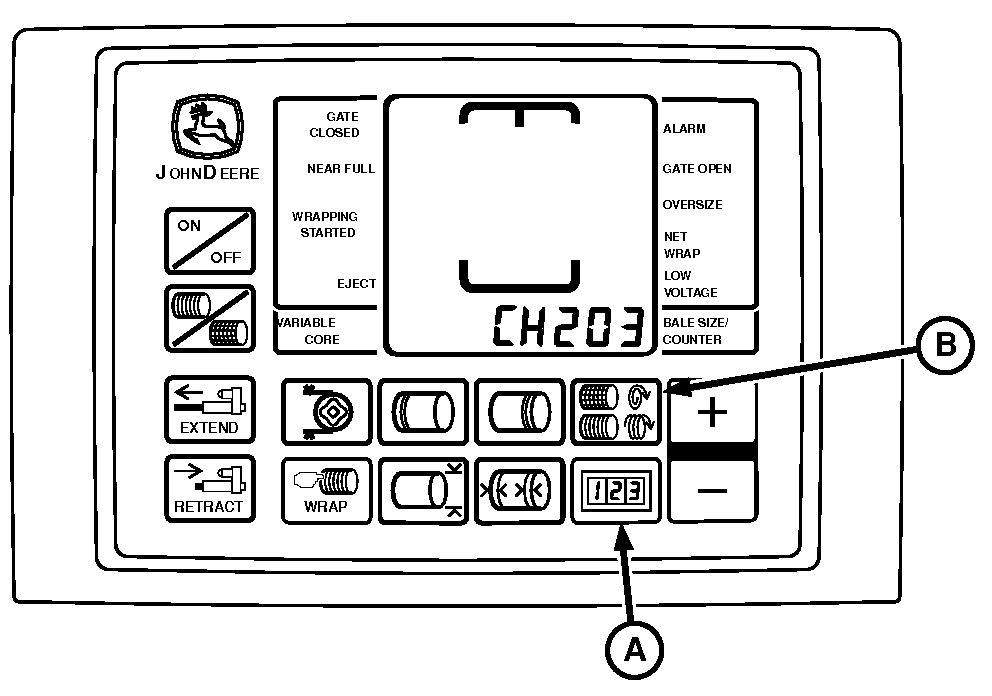
E57096-UN-08MAY09
BaleTrak™ Pro Monitor Controller Shown
A - COUNTER Key
B - NUMBER OF WRAPS Key
The net application feature can be turned OFF, ON, or switched to B-Wrap mode by accessing Channel 203.
The model number displayed on the monitor-controller must match the baler model number. The net binding, B-Wrap, twine, slip clutch alert, and optional variable core features only operate correctly if the numbers match.
If both net application and twine features are turned OFF, the monitor considers the twine feature ON.
Turning Feature On and Off:
-
Turn tractor key to ON position. Do not start the tractor.
-
Press and hold both COUNTER key (A) and NUMBER OF WRAPS key (B) for the BaleTrak™ Pro or the COUNTER key and the BALE SIZE key for the BaleTrak™ Plus while turning the monitor-controller to ON. CH201 must be displayed.
-
Release both keys. Baler model is displayed.
-
Press and hold COUNTER key (A) and press the PLUS key until CH203 is shown in display.
-
Release COUNTER key (A).
-
To change the displayed value to 0 (net OFF), 1 (net ON), or b1 (B-Wrap ON), press the PLUS or MINUS key.
Bale diameter must be set to 60 in and push bar disengaged to operate the B-Wrap.
-
Turn monitor-controller OFF to enter setting into memory.
-
Turn monitor-controller ON to verify baler model number. Model number is displayed for approximately 2 seconds. If displayed baler model number is incorrect, see Baler Model Program (Channel 201) in this section.
-
Turn tractor key to OFF position and remove key.
|
BaleTrak is a trademark of Deere & Company |
SF04007,0000F9F-19-20170914 |