Testing Liquid Crystal Display (LCD) Panel (Channel 020)
Use the following test procedure to check if a segment of the LCD panel has failed.
-
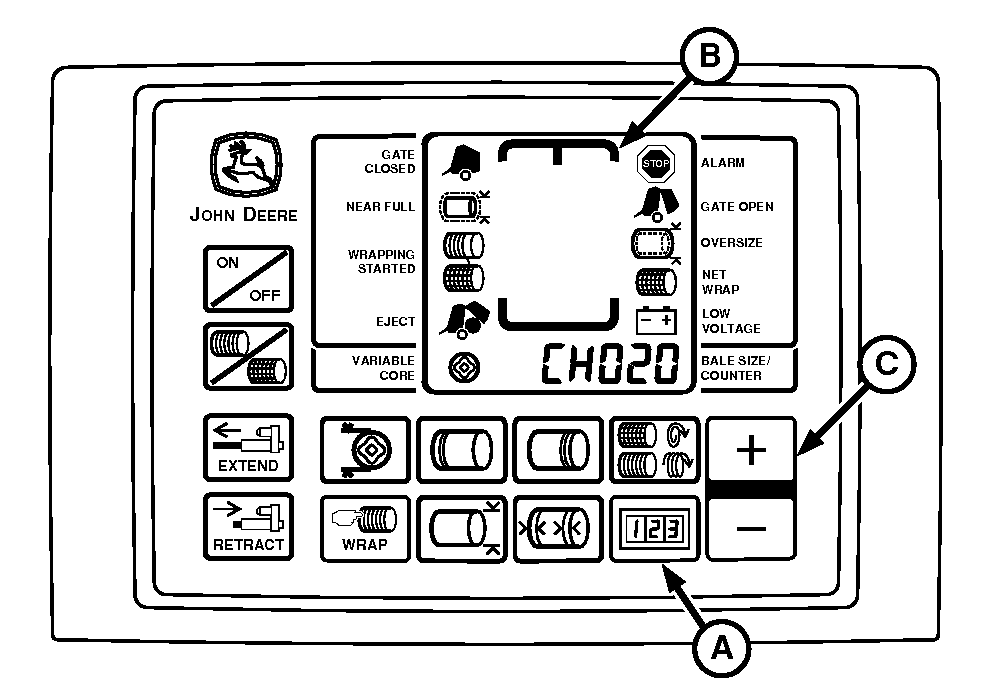
E52529-UN-10JUN08A - COUNTER Key
B - LCD Panel
C - PLUS Key
Turn tractor key to ON position. Do not start tractor engine. -
Press and hold COUNTER key (A) while turning monitor-controller ON.
-
Continue to hold COUNTER key (A) and press PLUS key (C) until CH020 appears in digital display.
-
Release keys and view entire LCD panel (B). Make sure that all segments and indicators are displayed. If not, see your John Deere dealer.
-
Turn monitor-controller OFF. Turn tractor key to OFF position and remove key.
|
GW44282,00005C5-19-20150914 |