Changing Baler Model Program (Channel 201)
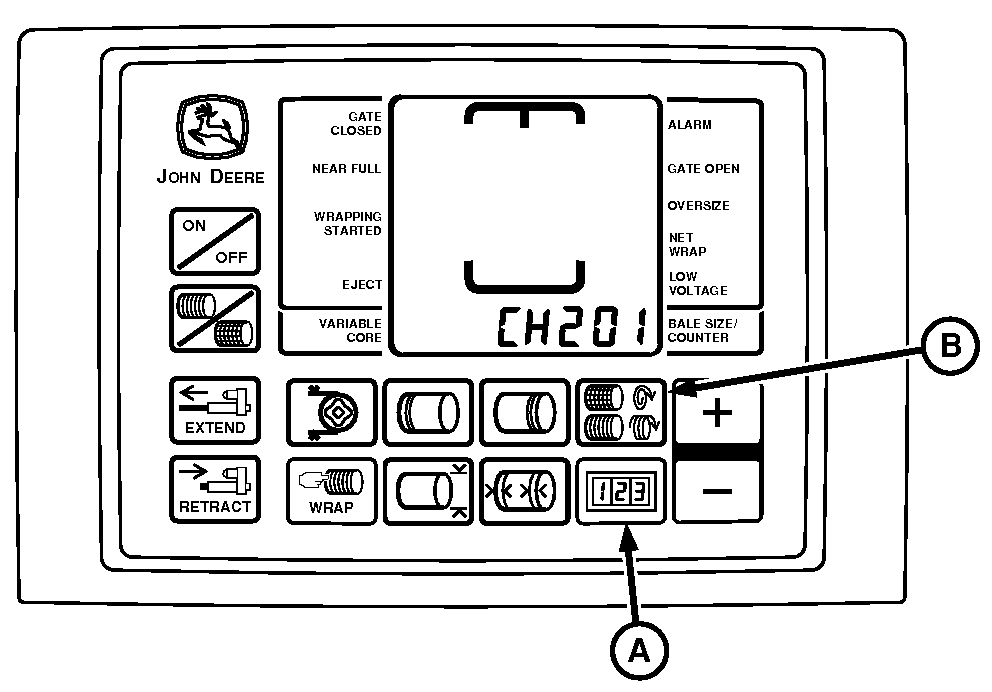
E52456-UN-10JUN08
A - COUNTER Key
B - NUMBER OF WRAPS Key
The monitor-controller software includes various model programs. Each program is written specifically for the baler model for which the monitor-controller was originally supplied.
When replacing monitor-controller with a new unit, or moving monitor-controller to a different model baler, review, and revise the model program if necessary.
The twine, net wrap, and optional variable core features will not operate correctly unless the model number displayed on monitor-controller matches baler model number.
To Change Model Program:
-
Turn tractor key to ON position. Do not start tractor.
-
Press and hold both COUNTER key (A) and NUMBER OF WRAPS key (B) while turning monitor-controller to ON. CH201 should be displayed.
-
Release both keys. Baler model is displayed.
-
Press PLUS or MINUS key to change to desired model.
-
Turn monitor-controller OFF to enter setting into memory.
-
Turn monitor-controller ON to verify baler model number. Which is displayed approximately 2 seconds. If displayed baler model number is incorrect, repeat Steps 1—6.
-
Turn tractor key to OFF position and remove key.
|
GW44282,00005C6-19-20150914 |