Test Net Wrap Switch—Monitor-Controller Assisted Test (Channel 012)
-
Microswitch position and operation can be checked by using the monitor-controller diagnostic channels.
E52494-UN-24JUN03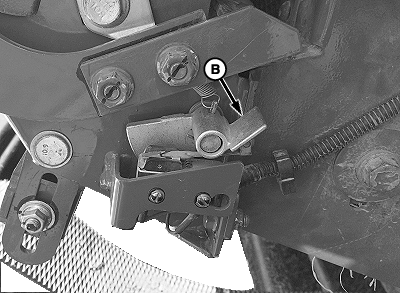
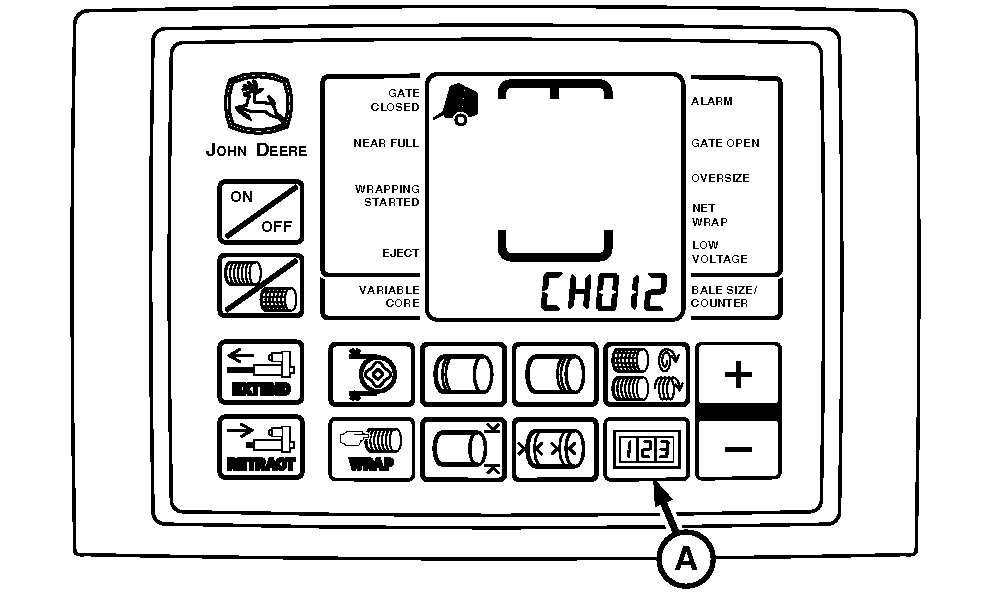
E79990-UN-22SEP15A - COUNTER Key
B - Lever
Turn tractor key to ON position. Do not start engine. -
Press and hold COUNTER key (A) while turning monitor-controller ON. Continue to hold COUNTER key (A) and press PLUS key until CH012 appears in digital display.
-
Release key and view reading (Switch Closed Internally).
Diagnostic Channel
Function
Switch Depressed Reading
Switch Released Reading
012
Net Wrap Switch
00 (Zero)—Cutting
12—Net Normal (Tone)
-
Depress lever (B) to open switch internally. View second reading or listen for tone (Switch Open).
-
If readings are not as shown, Check wire hookup. (See CHECK AND ADJUST NET WRAP SWITCH in this section.)
-
If switch adjustment does not produce normal readings:
-
Turn monitor-controller OFF. Turn tractor key to OFF position. Remove key.
-
Check for correct wire connections.
-
Check wire harness for cuts and breaks.
-
Check harness connectors for damaged (pushed in) terminals.
-
Check that wires are not shorted to each other or to ground.
-
Replace switch if necessary.
-
|
OUO6064,00015B7-19-20150922 |