Check and Adjust Net Wrap Switch
-


TS268-UN-23AUG88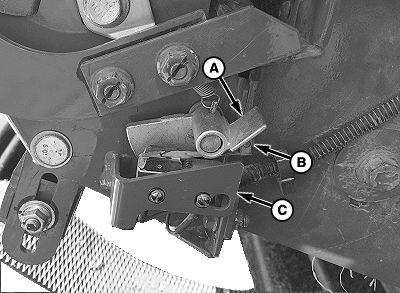
E80000-UN-22SEP15A - Switch Arm
B - Actuator Tab
C - Bracket
Knife is sharp and net wrap cut-off arm can move with out warning. Keep hands clear of knife arm.Turn tractor key to ON position. Do not start tractor engine.
-
Turn monitor-controller ON. Ensure monitor-controller is in NET mode.
-
Open net wrap cover.
-
Clean area around switch.
-
Verify actuator tab (B) overlaps bracket (C). Bend bracket (C) to obtain overlap.
Recheck monitor display and switch operation. (See Test Net Wrap Switch—Monitor-Controller Assisted Test (Channel 012 in this section.)
Verify monitor display and switch operation:
- Move knife arm angle to down position.
- Go to channel 012. Tone must come on.
- Rotate switch arm (A) down and tone must quit.
- Release switch arm (A) and tone must come on.
- If letter n does not appear on monitor display when actuator is down, or, letter n does not disappear when actuator is released, adjust switch.
-
Turn tractor ignition OFF and remove key.
-
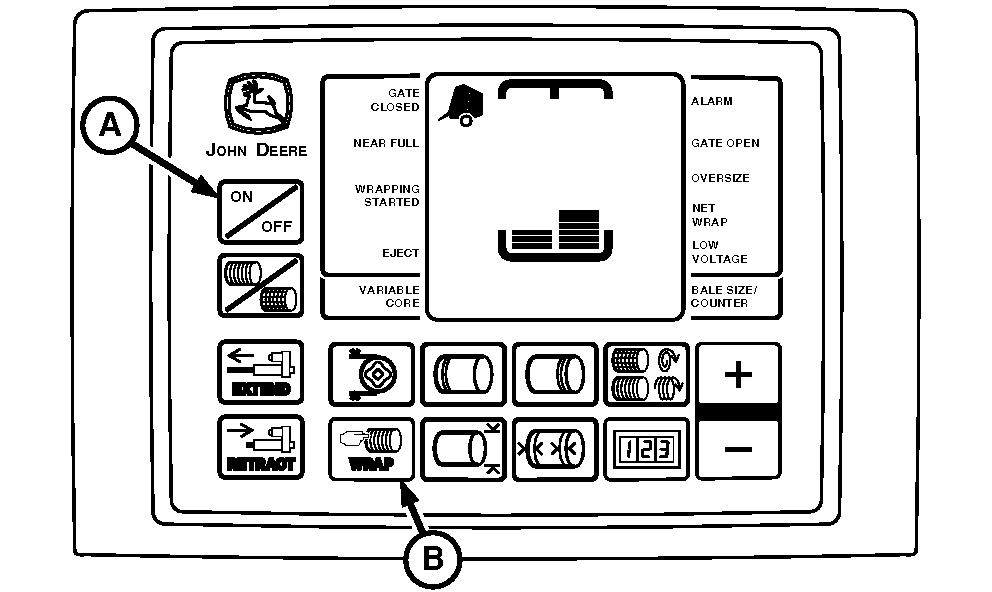
E52493-UN-24JUN03A - ON or OFF Key
B - WRAP Key
Close net wrap cover. -
Press WRAP key (B) to cycle net wrap actuator. Net wrap cut-off arm must be at home (downward) position.
If this procedure is not followed, net will be fed continuously during the next bale. The letter n will appear in monitor-controller display.
-
Turn monitor-controller OFF (A). Turn tractor key to OFF position. Remove key.
|
OUO6064,00015B8-19-20150922 |