Final Adjustment of Net Wrap Switch—In Field
-
Make level firm bale in chamber with monitor-controller in net mode. Stop tractor before auto wrap cycle begins.
-
Set number of wraps of net to 3.
-
With PTO running at rated speed, press WRAP key. After five seconds, turn monitor box switch to OFF position.
 Shut off tractor PTO, engine, place in park, and remove
key.
Shut off tractor PTO, engine, place in park, and remove
key. -
Unhook harness at tractor.
-
Open shield to access cut-off switch. Net must hold the actuator flap in a horizontal position.
Flap spring must be forward (towards front of baler) on its anchor.
-
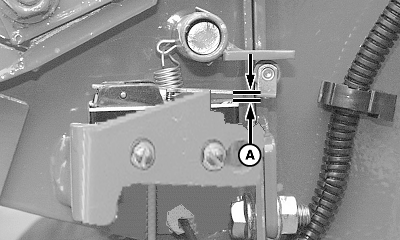
E79992-UN-22SEP15A - Clearance
Adjust switch to ensure roller arm-to-flap clearance (A) is within specifications.Switch Arm-to-Body of Switch Clearance (A) 0.2—1 mm (0.008—0.040 in.) -
Reconnect wire harness.
-
Start tractor. Turn on PTO. Then Press WRAP key. Net must cycle and cut off normally.
Failure to press WRAP key will result in continuous feeding of net and no cut-off.
-
Set monitor to number of wraps desired.
|
OUO6064,00015B9-19-20150922 |