Check and Adjust Net Wrap V-Belt Idler Tension
-

Protect bystander. To prevent injury, be sure that bystanders stand clear before operating the net wrap unit or baler.
TS268-UN-23AUG88Connect monitor-controller power plug to the power source.
-
Turn tractor key to ON position. Do not start tractor engine.
-
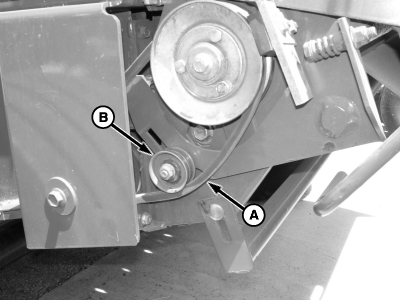
E55144-UN-10MAY07A - Belt
B - Idler Pulley
With channel 018 on monitor, cycle actuator using extend or retract key, so actuator moves approximately half way up or down, to loosen belt. -
To avoid personal injury from unexpected knife movement,
disconnect the net wrap actuator wire connector or power plug when
performing adjustment or working in area.
Temporally move the V-belt from the top of the idler pulley to underside of idler pulley.
-
Reconnect power source.
-
With monitor-controller in NET mode, press and hold COUNTER key while turning monitor-controller ON.
-
Continue to hold COUNTER key and press PLUS key until CH 018 appears in digital display.
-
To extend the actuator fully (angle to highest position), press the EXTEND key.
-
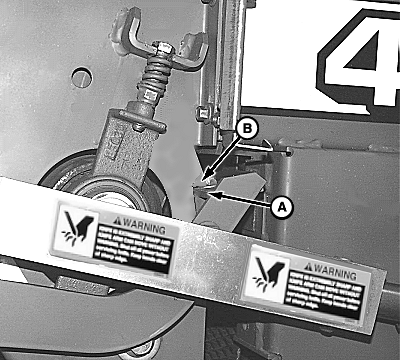
E51045-UN-03JAN02A - Angle
B - Tab
Check position of the right-hand net wrap cut-off arm (A). Arm must contact the tab (B) FIRMLY. If correct, proceed to step 10.If position is not correct, adjust base end of mounting bracket as follows to obtain firm contact:
-
Disconnect monitor-controller power plug from the power source.
-
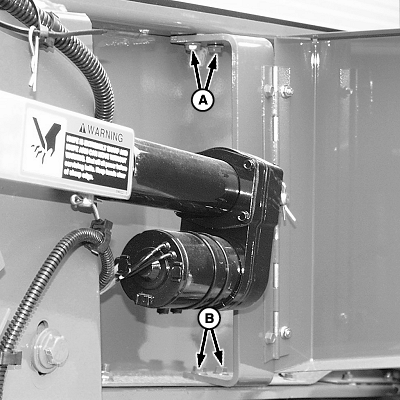
E49027-UN-18OCT00A - Screws
B - Round-Head Bolts
Loosen two screws (A) on top of bracket, two round-head bolts (B) and nuts on bottom end of bracket. -
Connect monitor-controller power plug to the power source. Repeat steps 5—7.
-
Retract actuator fully (to shortest position), and tighten bracket mounting bolts.
-
Extend actuator and recheck for firm contact.
-
-
Ensure that monitor is on channel 018. Use extend or retract key and return actuator to approximately half way up or down.
-
Disconnect actuator from the power source.
-
Move V-belt to top of idler pulley.
-
Reconnect to the power source.
-
Engage brake before extending actuator.
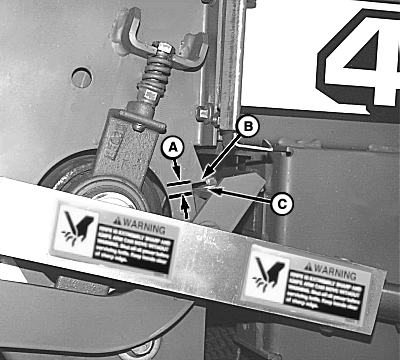
E51046-UN-03JAN02Right-Hand Side
A - Clearance
B - Tab
C - Angle
Right-Hand Side ONLY; Extend the actuator. Check that clearance (A) from angle (C) to tab (B) on the side sheet is within specifications.Angle-to-Tab On Side sheet Clearance 6—15 mm (1/4—9/16 in) -
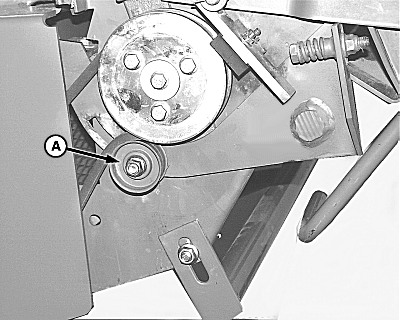
E51252-UN-11FEB02A - Idler
If clearance is not within specifications, adjust idler (A) in the idler arm slot until clearance is within specified range. -
Retract actuator and re-extend to check for correct clearance. If clearance is still not correct, readjust idler (A) and recheck.
-
Close the net wrap cover and shut actuator door.
-
After adjustment, turn monitor-controller ON. To return the net wrap cut-off arm to the home position, press the WRAP key. Turn monitor-controller off to cancel STOP alarm. If this procedure is not followed, net will be fed continuously during the next bale.
Connect monitor-controller power plug to the power source. Turn tractor key to ON position. Do not start tractor engine. Turn monitor-controller ON.
-
STOP alarm sounds while cycling actuator.
Cycle actuator several times using WRAP key.
-
Press WRAP key and return net knife to home (downward) position. (See Check And Adjust Net Wrap Feed Roll Brake in this section.)
-
Turn monitor-controller to OFF.
|
SF04007,000109D-19-20171116 |