Test Electrohydraulic Components
-
From the baler application main page, select the Settings softkey.
E84879-UN-09OCT17 -
Select the Baler Diagnostics softkey.
E64643-UN-11MAY12 -
Select the Test Output softkey.
E84890-UN-09OCT17 -
The Test Output function is used to test electrohydraulic components. To test a component, select the desired icon.
 CAUTION: During the test of electrohydraulic components, parts
of the machine move. Before performing a test, ensure that people
are clear of the machine.
CAUTION: During the test of electrohydraulic components, parts
of the machine move. Before performing a test, ensure that people
are clear of the machine. -
Test Output Page 1 :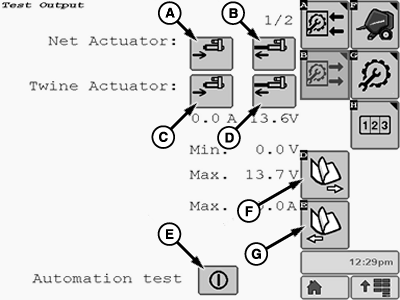
E85242-UN-01NOV17Icon (A) is used to retract the net actuator.
Icon (B) is used to extend the net actuator.
Icon (C) is used to retract the twine actuator.
Icon (D) is used to retract the twine actuator.
Icon (E) is used to test the automation features with your John Deere dealer or qualified service provider.
Softkey (F) is used to select the next page.
Softkey (G) is used to select the previous page.
-
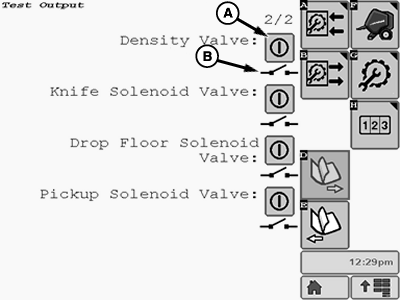
E85243-UN-01NOV17A - Status Symbol
B - Solenoid Valve Test Button
Test Output Page 2 :Test Output Page 2 allows testing the following solenoid valves for proper operation:
- Bale Density (Soft Core) Solenoid Valve
- Knife Solenoid Valve
- Drop Floor Solenoid Valves (2)
- Pickup Solenoid Valve
Status symbol (A) shows the component status (activated or deactivated).
Selecting the test button (B) sets the solenoid valve to the activated or deactivated state to test functionality.
-
To return to the baler application main page, select the Main Page softkey.
E84866-UN-05OCT17
|
DP99999,0000E79-19-20171109 |