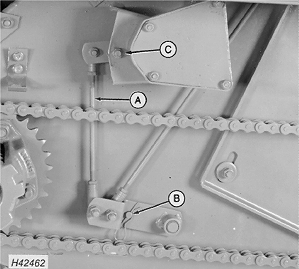
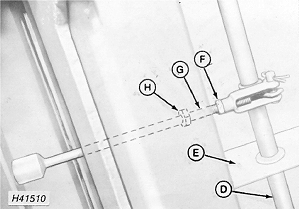
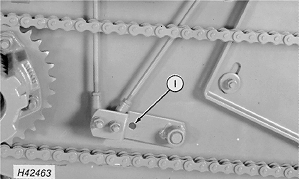
Adjusting Height Sensing Actuating Rods (If Equipped with DIAL-A-MATIC™ System)Adjusting each row unit for floating operation. Check adjustment of inner and outer gatherer sheet clearance. Adjust row unit float spring tension for floating operation. Adjust row unit skid shoes for your height of cut. For DIAL-A-MATIC ™ header height control to work right, the following adjustments must be made: 1. Raise header to maximum height and lower safety stop. 2. Check length of control rod (A) by installing pin (B) and cap screw (C) through holes in bulkhead. 3. After checking rod (A) length, remove pin (B) and cap screw (C) and retain for future use. 4. Check to see that sensing rod (D) rotates freely. If sensing rod will not rotate freely, adjust brackets (E). 5. Raise right-hand row unit to maximum height and hold or brace with safety stand. 6. Loosen lock nut (F) on actuating rod (G). 7. Adjust actuating rod (G) by turning weld nut (H). Adjust rod (G) until gauge hole (I) aligns with hole through left-hand bulkhead. NOTE: Bolt (C) and pin (B) must be removed when making this adjustment.
|
|
|
DIAL-A-MATIC is a trademark of Deere & Company | AG,OUO1035,2063 -19-24MAR00-1/2 |
|
8. Tighten lock nut (F) and lower row unit. 9. Repeat steps 5, 6 and 7 for each row unit in series from the right-hand or left-hand end of the header. |
AG,OUO1035,2063 -19-24MAR00-2/2 |