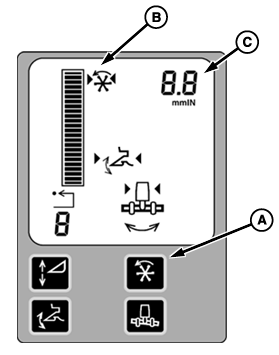
DIAL-A-SPEED SystemThe operator enables the DIAL-A-Speed system by using the DIAL-A-SPEED Enable Button (A) in the Corner post display. The double arrow under the DIAL-A-SPEED icon (B) will appear on the display. The DIAL-A-SPEED system can be activated only when:
The operator activates the system by pressing one of the Header Activation Buttons on the Multi-function handle. Arrowheads on each side of the icon indicates the system is activated. Manually raising the header will deactivate the DIAL-A-SPEED system immediately if the Active Header Height Control system is also active. If DIAL-A-SPEED is the only system active, raising the header for 1.5 Seconds (adjustable) the system will be deactivated. Pushing any of the Header Activation Buttons will reactivate the system. The operator disables the system by using the CONTOUR MASTER Enable Button in the corner post display. If all of the above conditions have been met, the system will control the reel or belt pickup speed to the ratio selected. Rotating the encoder clockwise will increase the ratio and counterclockwise will decrease the ratio. The larger the ratio number (B) selected, the faster the reel or belt pickup will operate with respect to combine ground speed. The selected ratio will be displayed numerically on the Corner post display. |
|
OUO6075,000186E -19-21JUN01-1/1 |