Deere-Delco AM/FM Stereo Radio With Weatherband and Cassette Player
|
|
|
|
|
|
Setting the Clock
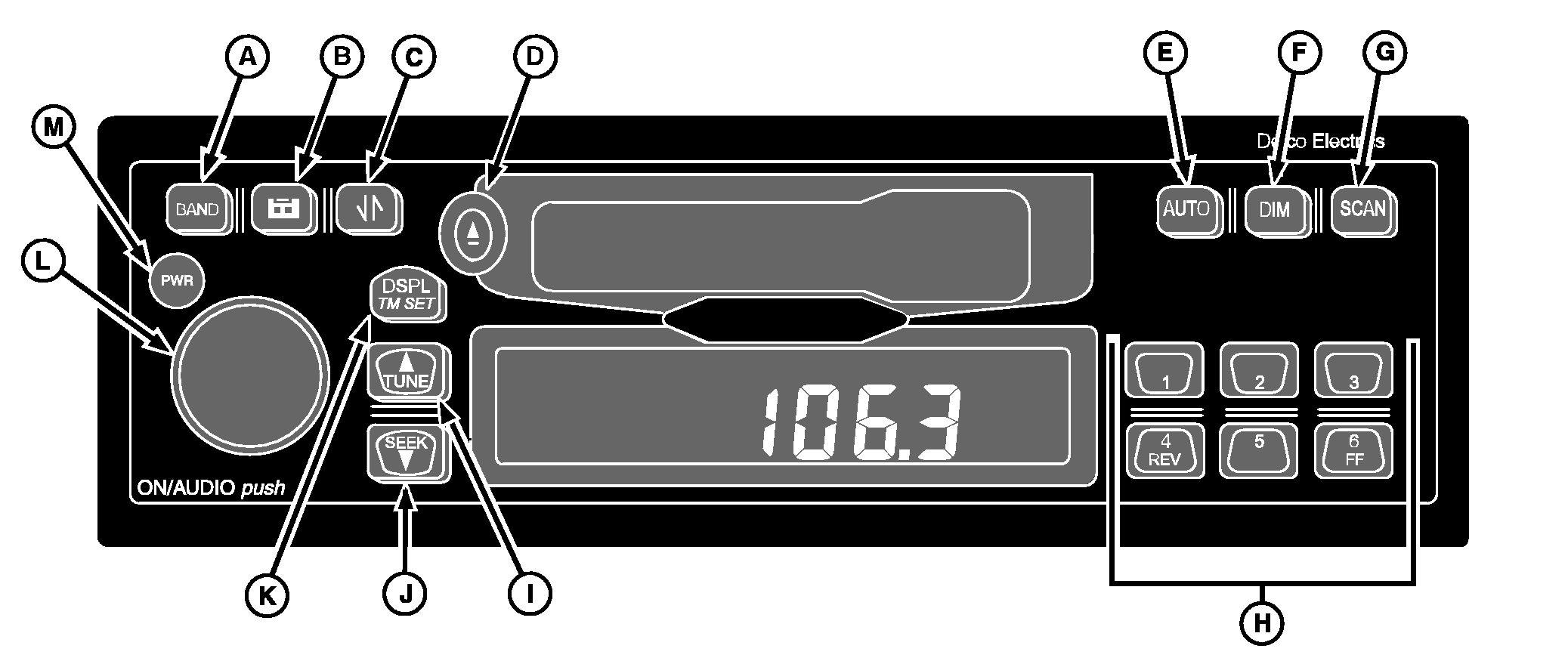
1. Turn the ignition on. 2. Press and hold the DSPL/TM SET button (K) until the hours digits flash. 3. Press the TUNE (up arrow) (I) or SEEK button (down arrow) (J) to set the correct hour. 4. Press the DSPL/TM SET button again and the minutes digits will flash. 5. Press the TUNE (up arrow) or SEEK button (down arrow) to set the correct minute. The seconds are reset to zero when the minutes setting is changed. After five seconds of inactivity the display will return to the default and the clock will be set. |
General Receiver Functions
Your receiver is equipped with two FM radio bands, FM1 and FM2. The two bands are the same, but allow you to set six presets in each band, for a total of 12 FM presets. Turning On the PowerWith the ignition on, the receiver may be turned on or off by pressing the PWR button (M). Pressing the ON/AUDIO knob (L) will also activate the receiver. DisplayThe receiver will display the time of day when the receiver is off. |
OUO6075,0001F2D -19-12APR02-1/3 |
|
Momentarily pressing the DISPL/TM SET button (K) when the receiver is on allows you to toggle between displays. When the receiver is in AM, FM1, FM2 or WX, the display will toggle between the frequency and time of day. When the receiver is in the cassette mode, the display will toggle between TP SIDE1/TPSIDE2 and the time of day. Setting Default Display1. Press and hold the DSPL/TM SET button for two seconds until the hours digits flash. 2. Press pushbutton 6 to change the display default. After five seconds of inactivity, the selected default will be displayed. Adjusting the Brightness of the DisplayIf the dash dimmer does not control the brightness of the receiver display, press and hold the DIM button (F) until "DIM" and the brightness level appear on the display. Rotate the AUDIO knob clockwise to increase the brightness of the receiver display and counterclockwise to decrease it. Adjusting the Receiver SettingsTo adjust the Volume, Bass, Treble, Fade, and Balance, press and release the ON/AUDIO knob repeatedly until the desired feature appears on the display. Volume - Volume is the default function. Rotate the AUDIO knob clockwise to increase the volume and counterclockwise to decrease it. The display will show "VOL" and the volume level. Bass - Press the AUDIO knob until "BASS" and the present level appear on the display. Rotate the knob clockwise to increase the bass sound and counterclockwise to decrease it. |
Treble - Press the AUDIO knob until "TREB" and the present level appear. Rotate the knob clockwise to increase the treble sound and counterclockwise to decrease it. Fade - Press the AUDIO knob until "FADE" and the present level appear on the display. Rotate the knob clockwise to move the sound to the front speakers and counterclockwise to move the sound to the rear. Balance - Press the AUDIO knob until "BAL" and the present level appear. Rotate the knob clockwise to move the sound to the right speakers and counterclockwise to move the sound to the left. After five seconds of inactivity, the receiver will return to the default display. Programmable Eject DefaultYour cassette player is pre-programmed to return to the radio band once a cassette is ejected. This default may be reset to "eject audio mute." When in this mode, the cassette player acts as an independent source. Upon ejecting a cassette the audio will mute the volume to zero, and the display will read "NO TAPE". The radio will remain muted until the BAND button is pressed, enabling the radio once again. To change the eject default: 1. Press and hold the DSPL/TM SET button for at least two seconds until the hours digits flash. 2. Press the tape button to toggle between "P.PLAY" and "EJMUTE". The receiver will return to normal operation after five seconds of inactivity. Finding a StationBand - Press button (A) to switch between FM, FM2, AM and Weather (WX). The receiver display will show your selection. |
OUO6075,0001F2D -19-12APR02-2/3 |
|
Tune/Seek - Press and hold both TUNE (I) and BAND (A) for two seconds to switch between manual tune and seek modes. The display will show either "MANUAL" or "SEEK" to indicate the mode. Manual Tune - Press the TUNE (I) button once to tune to the next higher or lower station one frequency at a time. The display will show "TUNE" and the frequency. Holding TUNE or SEEK button for more than 0.5 seconds begins fast tuning. Seek - Press the SEEK button (J) once to tune to the next higher or lower station. Holding SEEK for more than 0.5 seconds begins the Seek function. ("SEEK" will appear on the display.) When a station with a strong enough signal is found, the Seek function will stop and the station will play. If a station is not found with a strong enough signal after going through the band twice, the Seek function will stop and the current station will continue to play. Seek may be cancelled by pressing SEEK again. Auto Store - To automatically store the six strongest stations onto pushbuttons 1-6, press AUTO button (E) until "AUTO" and the "AS" icon appear on the display. AUTO only presets the band to which you are listening. In other words, if you pressed AUTO while listening to FM1, the presets on AM, FM2, and WX would not change Auto Store may be cancelled by pressing AUTO again. The original presets will be restored. |
Scan - Press SCAN button (G) to scan all stations on the band you are using. When a frequency of sufficient strength is found, the radio will play for five seconds and then continue scanning until you press SCAN again. The display will show "SCAN" and the frequency being scanned. Setting the PresetsThe six numbered pushbuttons (H) allow you to preset six of your favorite stations per band and easily return to them with the touch of a button. 1. Turn the receiver on. 2. Select the band. 3. Tune to the desired station. 4. Press and hold one of the six numbered buttons for more than two seconds to store the selected station. During the two second set time, the radio will be muted and the number icon will not be visible. Both the audio and selected preset icon will return indicating the station has been set. 5. Repeat steps 1-4 for each pushbutton. Pressing a preset button in the future will tune the radio to the station that you selected. |
OUO6075,0001F2D -19-12APR02-3/3 |