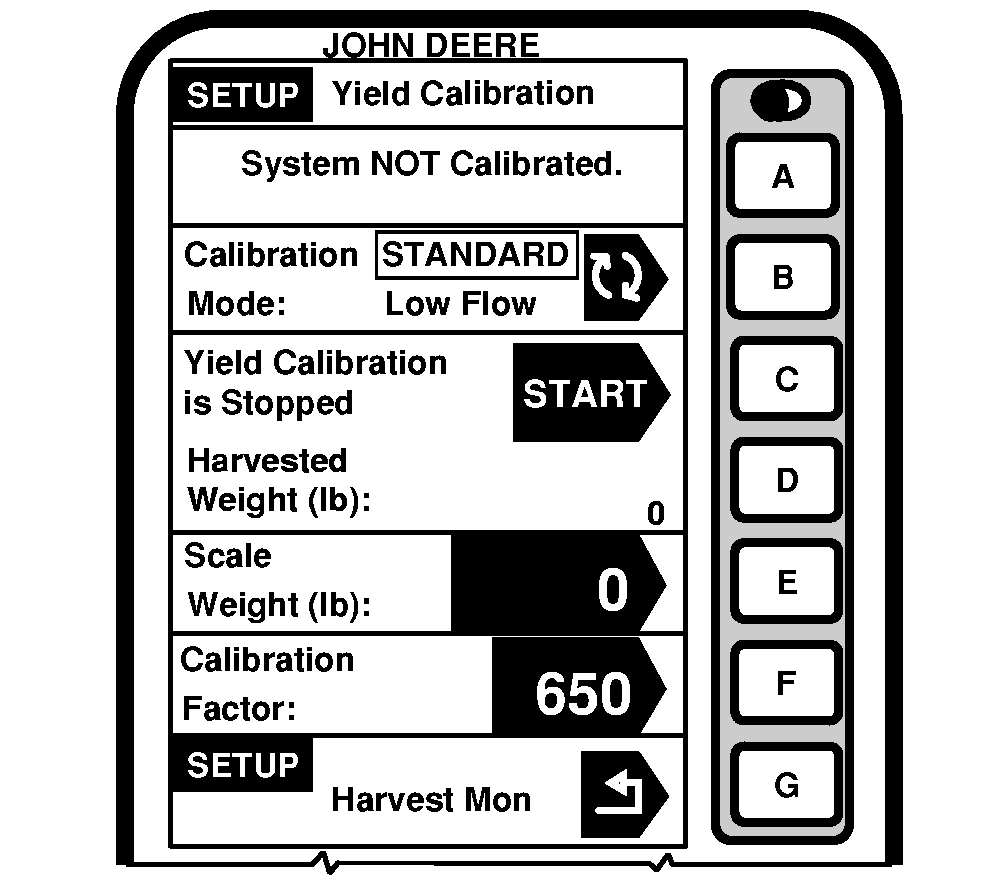
CalibrationGeneral Calibration InformationMass flow sensor must be calibrated in order to achieve accurate grain weight measurements. Standard Calibration procedure must be performed in every crop that is harvested. In addition, the optional Low Flow Compensation procedure may be performed to obtain an improved level of accuracy in situations where there are large variations in grain flow rate. The following paragraphs describe the different screens that are used in the calibration procedure. Calibration In Progress or System Not Calibrated CellThis section displays if the mass flow sensor has been calibrated to the desired crop. If the system has not be calibrated a message displaying "System NOT Calibrated" will be displayed. If standard calibration has been performed a bar graph indicating the flow rate sensor has been accurately calibrated. If a standard and low flow calibration has been completed, the bar graph will expand to show an increased area of accuracy. Calibration Mode CellThis screen indicates whether Standard Calibration procedures or optional Low Flow procedure is to be performed. Press letter button next to "Calibration Mode" to switch between "Standard Calibration" and optional "Low Flow Calibration". Yield Calibration CellThis screen allows calibration procedure to be "Started" or "Stopped". |
|
OUO6075,0003106 -19-10OCT03-1/2 |
|
Harvested Weight Cell
This screen indicates the approximate weight of grain that has been harvested during the calibration process. Scale Weight CellThis screen allows scale weight to be entered after a calibration run is complete (during calibration run, indicates approximate weight of grain that has been harvested). Calibration Factor CellValue shown here allows mass flow sensor to read accurately. This value will be updated automatically by Calibration procedure. This value can also be adjusted manually. |
OUO6075,0003106 -19-10OCT03-2/2 |