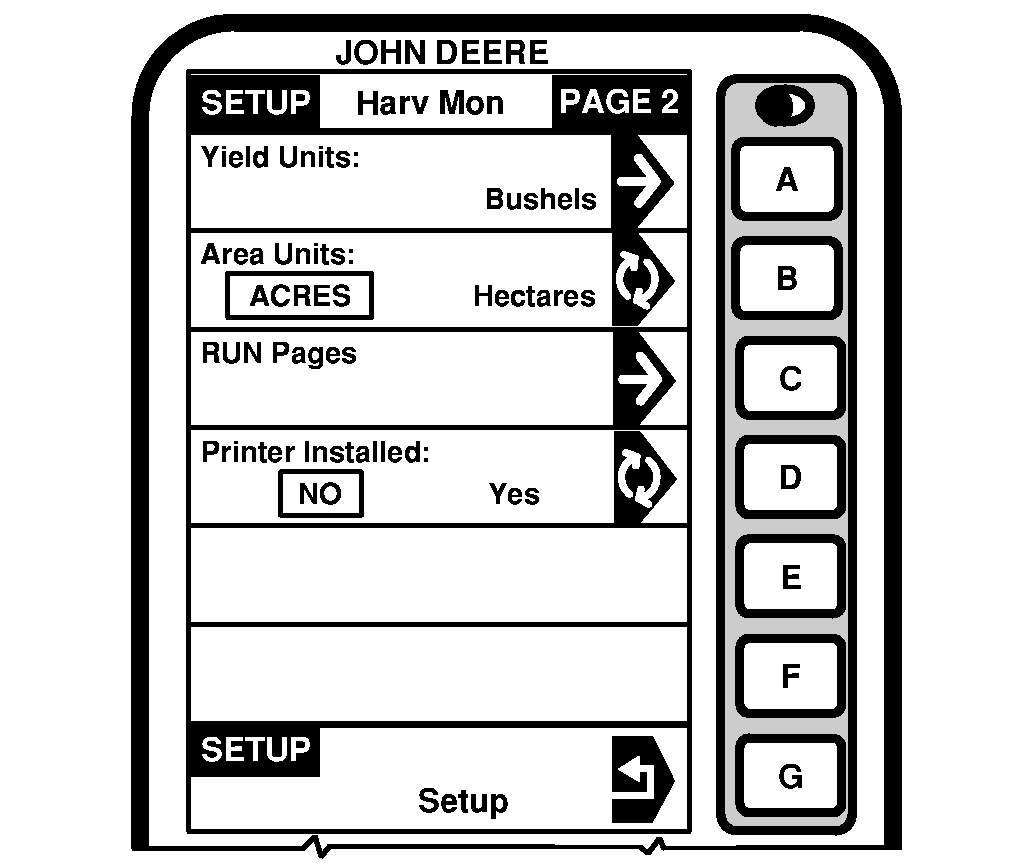
SETUP - Harv Mon - PAGE 2This screen is a continuation of SETUP - Harv Mon - PAGE 1 screen. This screen allows the operator to choose "Yield Units" and "Area Units" that will be displayed on RUN pages. It also allows the operator to configure "RUN pages" and turn "Printer Functions" ON/OFF. Yield UnitsNOTE: See Standard Weights Chart section for standard weights of corps. To select the units of measure for yield readings, press letter button next to "Yield Units" and SETUP - Yield Units - PAGE 1 will appear. Press letter button next to desired unit. Area UnitsPress letter button next to "Area Units" To select "Acres or Hectares" press letter button next Area Units" on SETUP - Harv Mon - PAGE 2 screen. "Area Unit" will toggle between "Acres" and "Hectares". Selection will appear boxed in capital letters. |
|
OUO6075,000310B -19-10OCT03-1/1 |