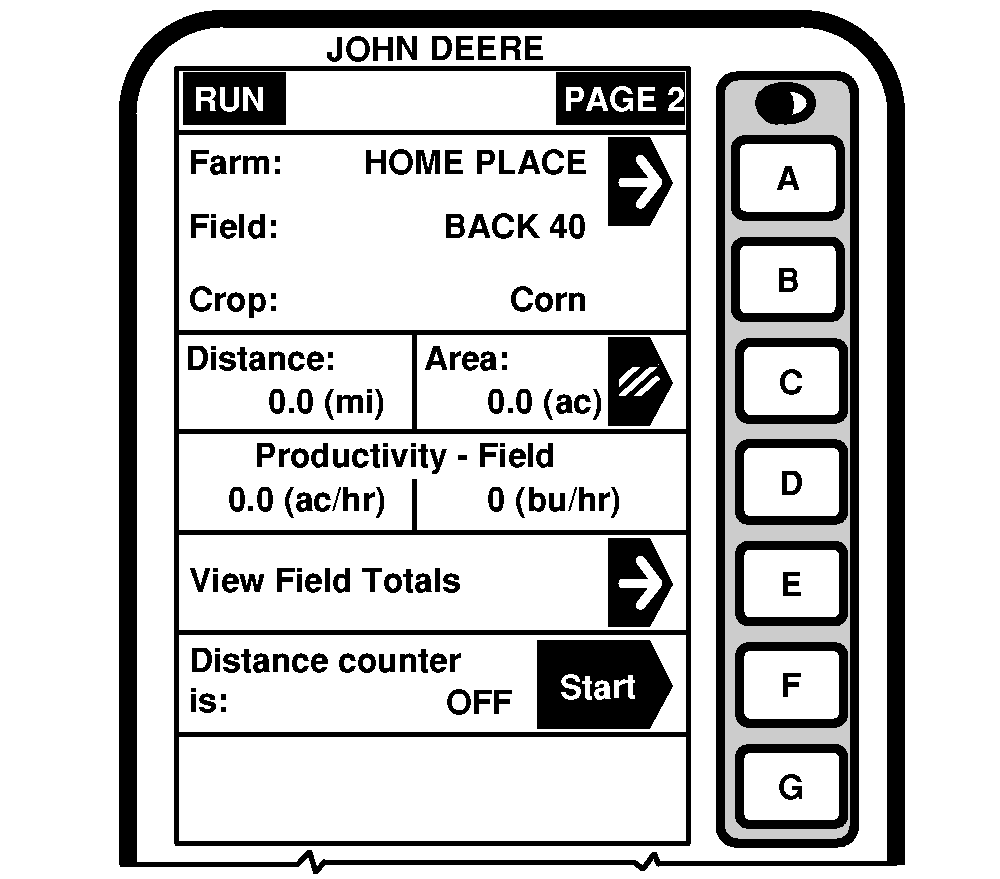
Run - PAGE 2RUN - PAGE 2 screen displays the following information: FarmNOTE: Make sure correct farm name is displayed. This cell displays the farm name being harvested. Farm name was entered on SETUP - Harv Mon - PAGE 1. FieldNOTE: Make sure correct field name is displayed. This cell shows field name being harvested. Field name was entered on SETUP - Harv Mon - PAGE 1. CropThis cell shows the type of crop being harvested. Crop was entered on SETUP - Harv Mon - PAGE 1. Distance/AreaNOTE: Press letter button next to "Distance/Area" cell to erase Distance and Area numbers. Farm, Field, and Crop Totals will not be cleared on this page. Only the current Run - Page 2 totals will be cleared. This cell shows total distance traveled and area since the button next to "Distance/Area" cell was pressed. Productivity - FieldThis cell displays combine harvest productivity in area unit per hour and yield unit per hour. Field TotalsThis cell displays the Farm, Field, and Crop totals when harvesting and allows the user to select different Farm, Fields, and Crops from the system. Information also included in these cells: Area (AC), Yield Dry (bu/ac), Yield Wet (bu/ac), Total Dry (bu), Total Wet (bu), Total Dry (lb.), Total Wet (lb.), Moisture (%). |
|
OUO6075,0003103 -19-10OCT03-1/2 |
|
Distance Counter
Allows the user to start and stop the distance counter. |
OUO6075,0003103 -19-10OCT03-2/2 |