Replacing Auger Fingers and Retainers
2. Pull up on tensioner arm sheave handle (A) to relieve belt tension. 3. Remove drive belt (B). |
|
 CAUTION:
Avoid serious injury from cutterbar movement when auger is turned. Remove knife drive belt (see Remove Knife Drive Belt From Drive Seave in Auger Stipper Adjustments section).
CAUTION:
Avoid serious injury from cutterbar movement when auger is turned. Remove knife drive belt (see Remove Knife Drive Belt From Drive Seave in Auger Stipper Adjustments section).

OUO6091,0001824 -19-26MAY04-1/5 |
|
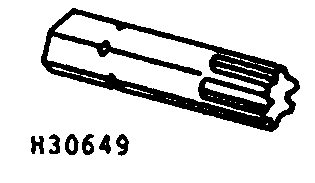
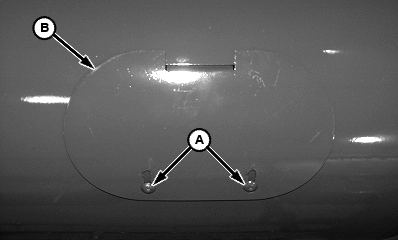
NOTE: Order JDC-3 from your John Deere dealer. Use driver with 1/4 to 3/8-in. adapter. 4. Use JDC-3 or TORX T-40 driver to loosen TORX screws (A) and remove access hole covers (B).
|
|
|
TORX is a trademark of Camcar/Textron | OUO6091,0001824 -19-26MAY04-2/5 |
|
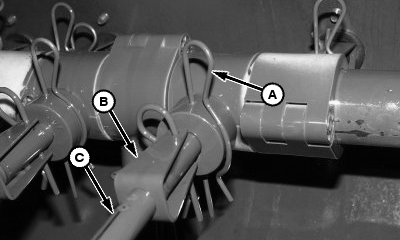
NOTE: If replacing composite auger fingers, skip to step 7. 5. Steel Auger Fingers Only: Remove pin (A) and remove broken parts. IMPORTANT: Replace auger finger retainers (B) when replacing steel auger fingers (C). Make sure fingers are securely fastened by pins (A) before replacing access hole cover. 6. Install new parts and retain with pin (A). |
|
OUO6091,0001824 -19-26MAY04-3/5 |
|
7.
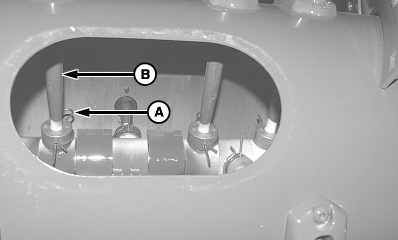
Composite Finger Only:
Remove spring clip (A) and finger (B).
8. Install new finger and retain with spring clip.
|
|
OUO6091,0001824 -19-26MAY04-4/5 |
|
9.
Install access hole covers (B) and retain with TORX screws (A).
10. Reinstall drive belt and close left-hand end shield.
|
|
OUO6091,0001824 -19-26MAY04-5/5 |