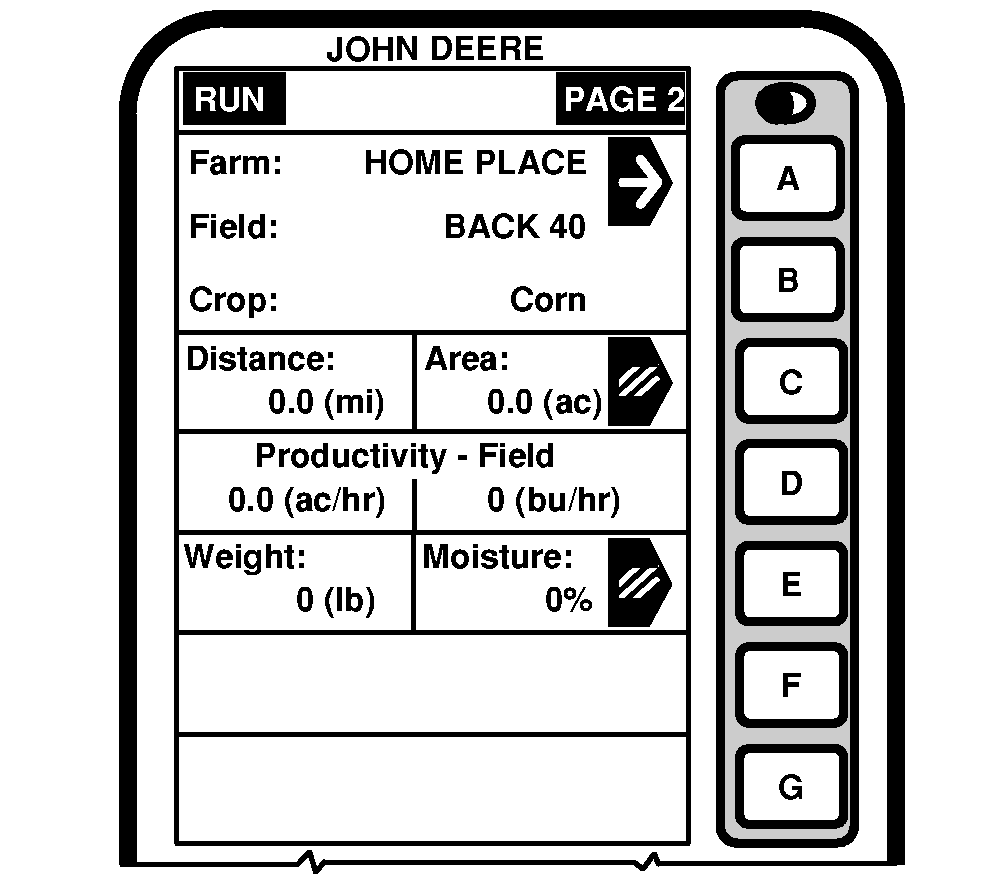
Run - PAGE 2RUN - PAGE 2 screen displays the following information: FarmNOTE: Make sure correct farm name is displayed. This cell displays the farm name being harvested. Farm name was entered on SETUP - Harv Mon - PAGE 1. FieldNOTE: Make sure correct field name is displayed. This cell shows field name being harvested. Field name was entered on SETUP - Harv Mon - PAGE 1. CropThis cell shows the type of crop being harvested. Crop was entered on SETUP - Harv Mon - PAGE 1. Distance/AreaNOTE: Press letter button next to "Distance/Area" cell to erase Distance and Area numbers. Farm, Field, and Crop Totals will not be cleared on this page. Only the current Run - Page 2 totals will be cleared. This cell shows total distance traveled and area since the button next to "Distance/Area" cell was pressed. Productivity - FieldThis cell displays combine harvest productivity in area unit per hour and yield unit per hour. |
|
OUO6075,0003A26 -19-23SEP04-1/2 |
|
Weight/Moisture
NOTE: Press letter button next to "Weight/Moisture" cell to erase Weight and Moisture numbers. Farm, Field, Crop Totals will not be cleared on this page. Only the current Run - Page 2 totals will be cleared. This cell shows the weight and moisture numbers since the button next to "Weight/Moisture" cell was pressed. |
OUO6075,0003A26 -19-23SEP04-2/2 |