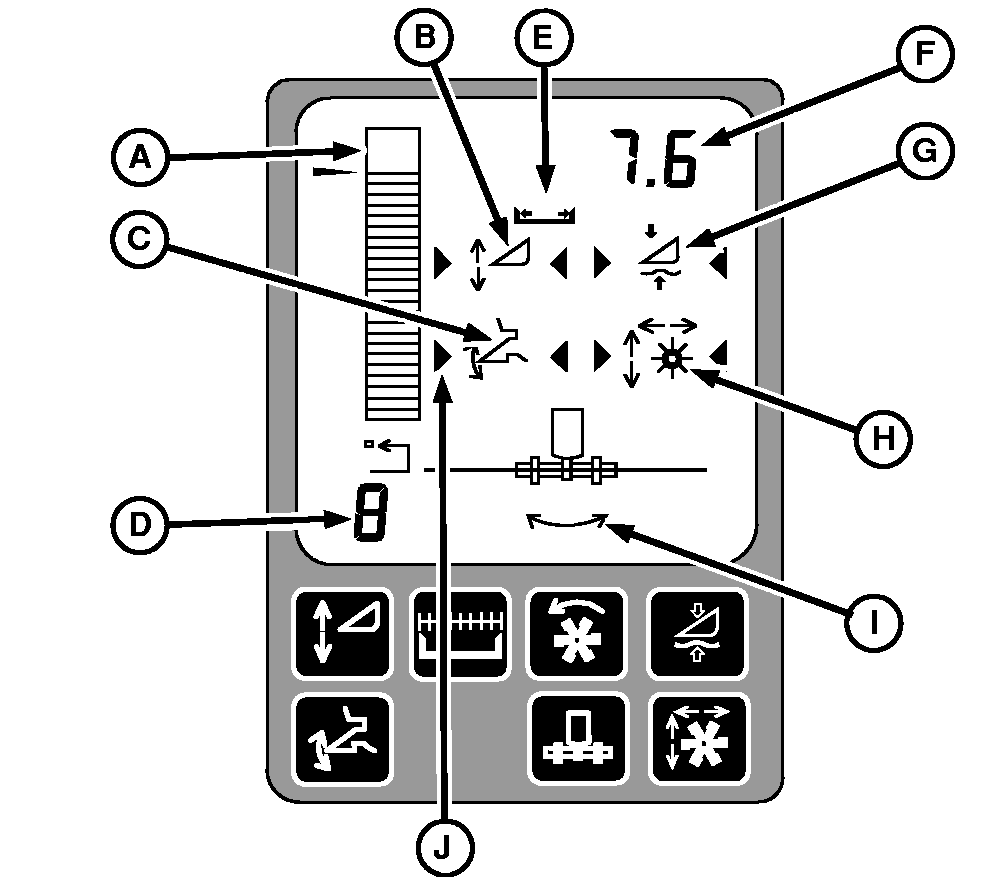
HEADERTRAK Control Display
-
A
indicates height or pressure relative to the ground
-
B
appears if HEADERTRAK Stubble Height is enabled
-
C
appears if HEADERTRAK Return to Cut is enabled
-
D
indicates which HEADERTRAK activation button was pressed
-
E
indicates full or part of header width
-
F
shows header position relative to ground or header lift pressure, shows reel speed ratio (when adjusted) and shows header width or number of rows (when adjusted). (cutting platforms units are meters for metric system and feet for English system)
-
G
appears if HEADERTRAK Ground Pressure is enabled
-
H
appears if Reel Resume is enabled
-
I
appears if HEADERTRAK Lateral Tilt is enabled
-
J
appears if any mode is activated
Only one HEADERTRAK mode can be activated at a time. HEADERTRAK Stubble Height Control Icon (B), HEADERTRAK Return to Cut Icon (C) or HEADERTRAK Ground Pressure Icon (G) if activated will be indicated by activation arrows.
If any of the HEADERTRAK modes are activated, Reel Position Resume and HEADERTRAK Lateral Tilt will also be activated, if enabled.
|
A-Height and Pressure Bar Graph Indicator
B-HEADERTRAK Stubble Height Control Icon
C-HEADERTRAK Return to Cut Icon
D-HEADERTRAK Activation Button Display
E-Header Width Icon
F-Numerical Display
G-HEADERTRAK Ground Pressure Icon
H-Reel Position Icon
I-HEADERTRAK Lateral Tilt Angle
J-Activation Arrows
|