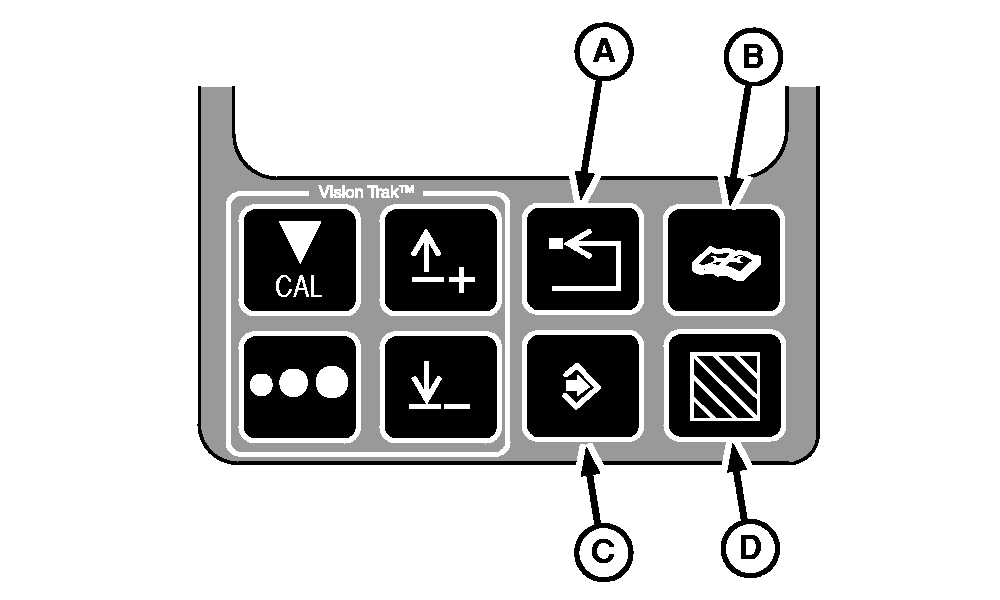
Additional VISIONTRAK Display Control Buttons
A-Back Arrow Button
B-Diagnostics Button
C-Enter Button
D-Area Counter Button
|
|
|
|
OUO6075,0003ADE -19-08OCT04-1/5
|
Back Arrow Button
Press back arrow button allows the operator to back out to the previous mode.
|
|
|
|
OUO6075,0003ADE -19-08OCT04-2/5
|
Diagnostics Button
Press diagnostic button will put the monitor into the diagnostic mode.
|
|
|
|
OUO6075,0003ADE -19-08OCT04-3/5
|
Enter Button
Press enter button allows entry of data into the memory.
|
|
|
|
OUO6075,0003ADE -19-08OCT04-4/5
|
Area Counter Button
Press area counter button will allow the operator to display the total area on the top line of the display.
|
|
|
|
OUO6075,0003ADE -19-08OCT04-5/5
|
|