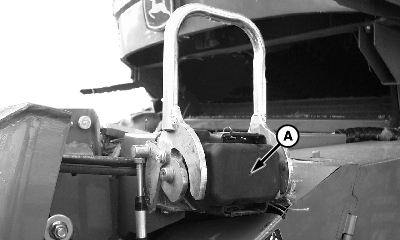
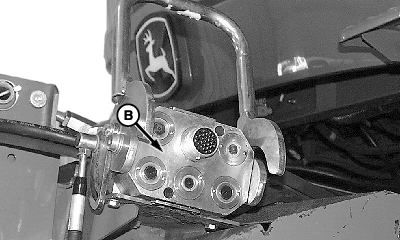
Attach Multi-Coupler and Single Point LatchingIMPORTANT: Latch pins are not to be actuated with header on the ground. If multi-coupler must be actuated with header on ground, unhook cable from handle. Remove cover (A) and clean multi-coupler face (B).
|
|
OUO6075,0003DAC -19-07FEB05-1/6 |
|
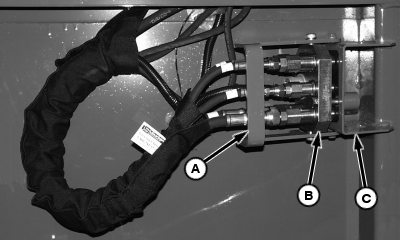
Open handle (A) and remove multi-coupler (B) from storage bracket (C).
|
|
OUO6075,0003DAC -19-07FEB05-2/6 |
|
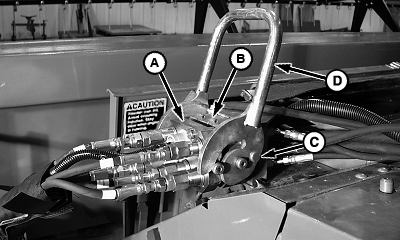
NOTE: To prevent damage to latching cable, a shear screw is attached to the handle. Attempts to actuate latching pins with header on ground will shear the screw on the handle. (See Extra Shear Screw Location later in this section.) Install multi-coupler (A) onto receptacle (B). Pull and hold button lock (C) to close handle (D).
|
|
OUO6075,0003DAC -19-07FEB05-3/6 |
|
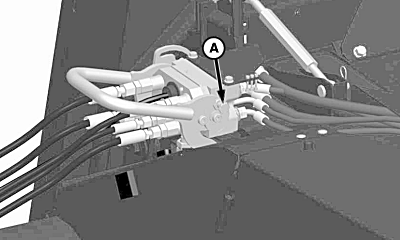
IMPORTANT: Failure to close multi-coupler fully so button lock can engage could result in the header falling off while harvesting or transporting. When multi-coupler handle is fully closed, button lock (A) will automatically lock couplers together.
|
|
OUO6075,0003DAC -19-07FEB05-4/6 |
|
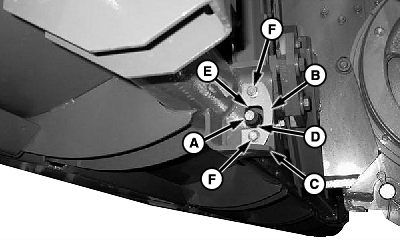
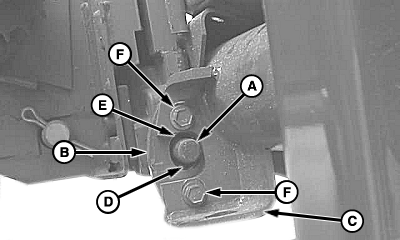
NOTE: With header attached, latch pins should move freely through latch plate holes. If latch pins do not extend through the latch plates, make sure that the latching plates on the header are properly adjusted. Latch pins (A) should move freely through latch plate holes in header when multi-coupler is latched. Latch plate (B) must make contact with bracket (C). Less clearance (D) should be maintained between bottom of plate and pin rather than top of plate (E) and pin. This may require latch plate to be flipped. If adjustment is needed: Remove cap screws (F), flip plate (D) end for end and reinstall. NOTE: 600 series platforms have two different latch plate styles. Older 600 series platforms have the latch plate on the outside, while the new 600 series platforms have the latch plate to the inside. Verify which latch plate style is on the platform before tightening hardware. Tighten cap screws to M10 or M12 specification. Specification
Specification
|
|
OUO6075,0003DAC -19-07FEB05-5/6 |
|
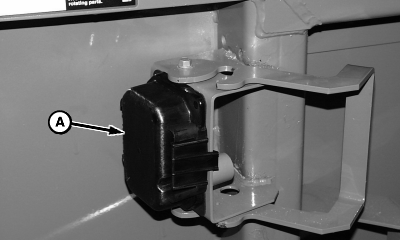
Install multi-coupler cover (A) on platform storage position. Remove telescopic shaft from storage position and install onto feeder house backshaft, making sure quick attach collar locks fully.
|
|
OUO6075,0003DAC -19-07FEB05-6/6 |