Deere-Delco AM/FM Radio with Weatherband and CD Player
|
|
|
|
|
|
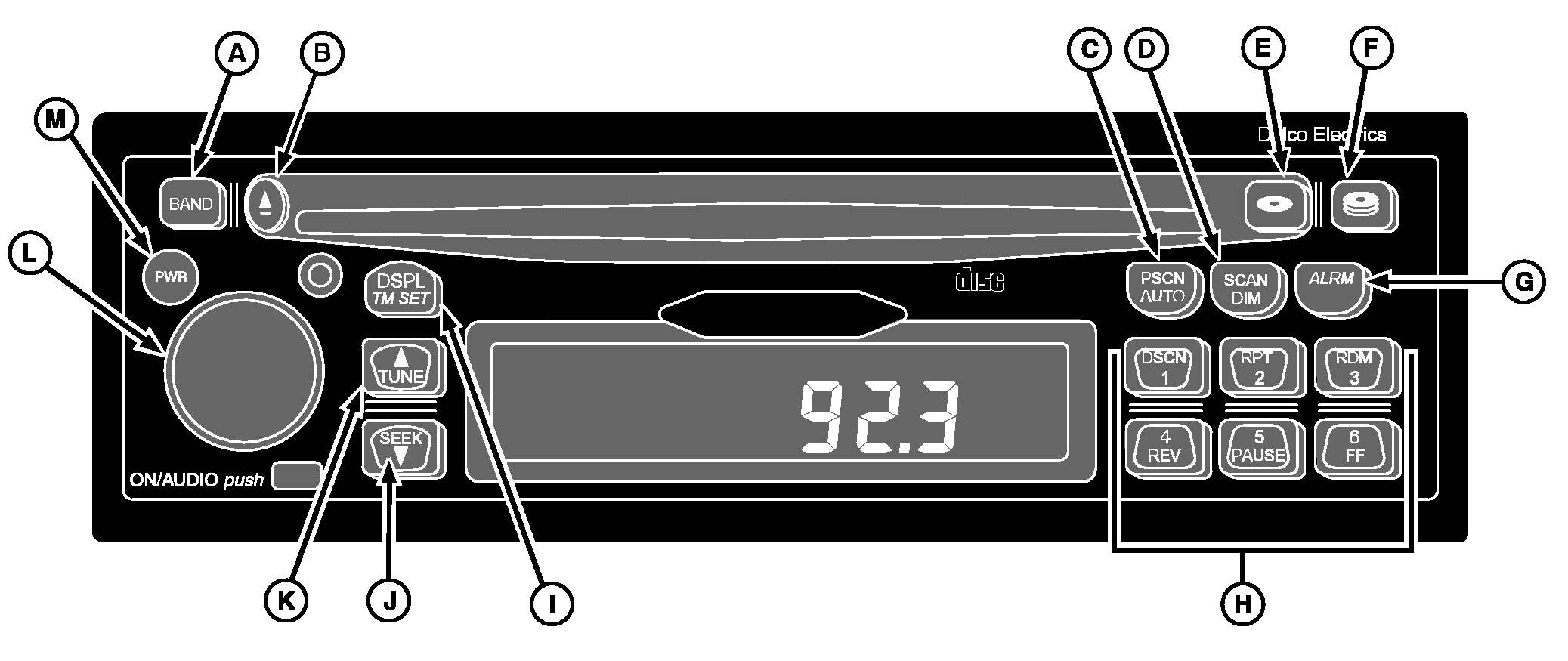
NOTE: For all other radio functions see DEERE-DELCO AM/FM STEREO RADIO WITH WEATHERBAND in this section. Using the AlarmMomentarily pressing the ALRM button (G) will display the alarm set time. When you see the "ALARM' icon on the display, the alarm has been set. If the radio is on when the alarm sounds, you will hear a beeping noise. If th receiver is off, the alarm will turn on and play the radio at the alarm volume. The alarm will continue to sound until you activate snooze or you turn the alarm off. Setting the Alarm1. Press and hold the ALRM button (G) for two seconds until the "ALARM" icon illuminates and the hours digits of the alarm time flash. This indicates that you are in the alarm setting mode. |
2. Press and release the TUNE button (K) or SEEK button (J) until the desired alarm hour appears on the display. 3. Press the ALRM button again to select the minutes display. 4. Press the TUNE or SEEK button until the desired alarm minutes appear on the display. Turning Off the AlarmPress and hold the ALRM button until you hear a "beep" and the "ALRM" icon on the display disappears. Activating SnoozePress any button or the AUDIO knob (L) when the alarm is sounding. The alarm will sound again in nine minutes. |
OUO6075,0002604 -19-22MAR06-1/4 |
|
Setting the Alarm Volume
1. Turn the receiver on. 2. Press and hold the ALRM button for two seconds until the "ALRM" icon illuminates and hours digits of the alarm time flash. Rotate the AUDIO knob to increase or decrease the volume as desired. After five seconds of inactivity, the receiver will return to the default display and the volume level at which the receiver was previously playing. NOTE: The alarm will be activated unless the ALRM button is held for two seconds again. General Receiver FunctionsYour receiver is equipped with three FM radio bands, FM1, FM2 and FM3. The three bands are the same, but allow you to set six presets in each band, for a total of 18 FM presets. Turning On the PowerWith the ignition on, the receiver may be turned on or off by pressing the PWR button (M). Pressing the ON/AUDIO knob (L) will also activate the receiver. After five seconds of inactivity, the receiver will return to the default display, and the "ALARM" icon will remain illuminated indicating the alarm is set. One-Hour TimerWith the ignition off, the receiver may be turned on by pressing the PWR button or the ON/AUDIO knob. This activates the one hour timer of the receiver. The receiver will turn off after one hour. The timer may be |
reactivated by pressing the PWR button or the ON/AUDIO knob again.
Display
The receiver will display the time of day when the receiver is off. Momentarily pressing the DISPL/TM SET button (I) when the receiver is on allows you to toggle between displays.
Your player is pre-programmed to return to the radio band once a CD is ejected. This default may be reset to "eject audio mute." When in the mode, the player acts as an independent source. Upon ejecting a CD, the audio volume will mute to zero, and the display will read "NO CD". The receiver will remain muted until the BAND button is pressed, enabling the radio. To change the Eject default: 1. Press and hold the DSPL/TM SET button for at least two seconds until the hours digits flash.2. Press the CD mode button (E) to toggle between P.PLAY and EJMUTE. The receiver will return to normal operation after five seconds of inactivity. |
OUO6075,0002604 -19-22MAR06-2/4 |
|
|
|
|
|
|
CD Button Functions
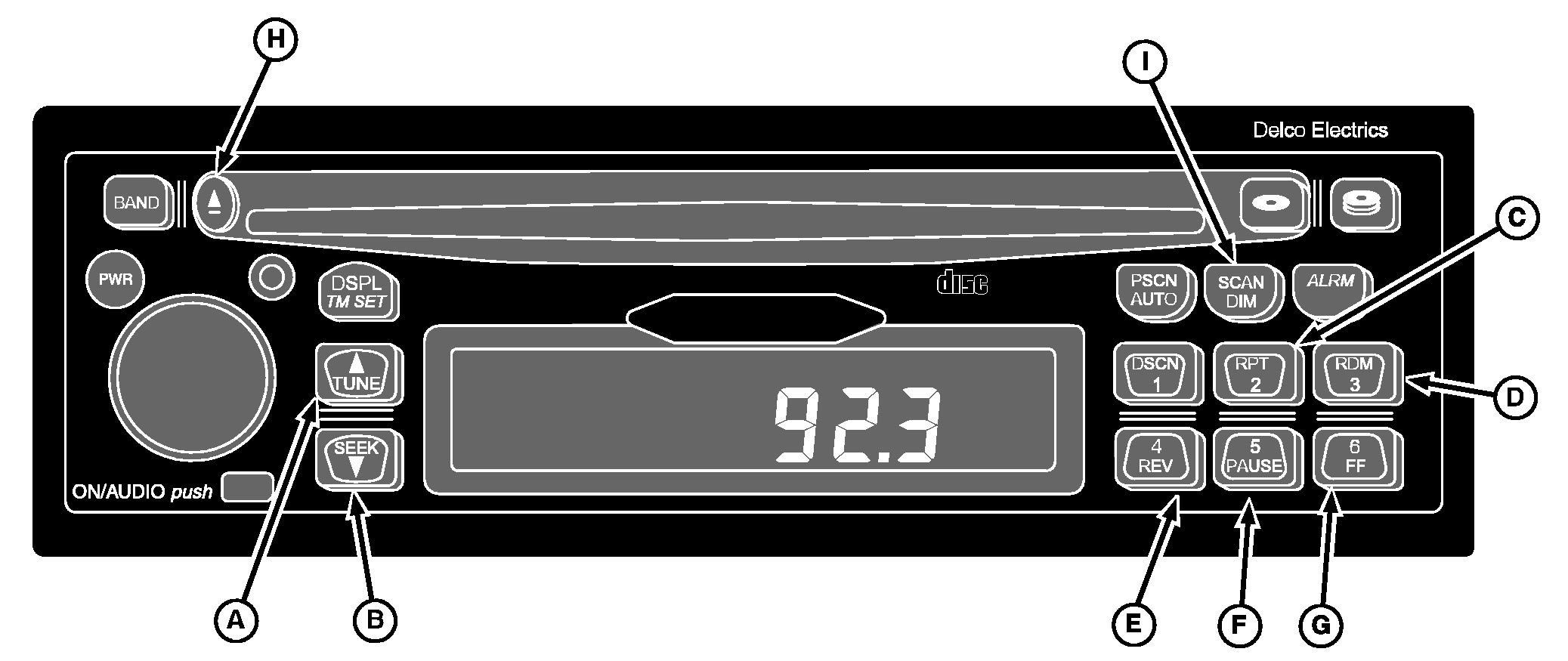
TUNE (A) - Forwards to the next track. The display will show the track number and elapsed time. SEEK (B) - Reverses to the beginning of the track being played. If this button is pressed during the first eight seconds of the track, the previous track will be played. The display will show the track number and elapsed time. 2/RPT (C) - Repeats the current track. The "RPT" icon on the display indicates that this feature is on and the track will be repeated until RPT is pressed again. 3/RDM (D) - Activates random track selection. The "RDM" icon will illuminate on the display. Tracks on loaded CDs will be played in random order. Press the RDM button again to turn off "random play" beginning with the next track played. 4/REV (E) - Press and hold RV to fast reverse. Upon release, the CD will play at normal speed. The display will show the track number and elapsed time. 5/PAUSE (F) - Pauses CD. "PAUS" will be displayed. Press PAUSE again to resume playing the CD. |
6/FF (G) - Press and hold FF to fast forward. Upon release, the CD will play at normal speed. The display will show the track number and elapsed time. EJECT (H) - Press to eject a CD. SCAN/DIM (I) - Press SCAN to scan all tracks on the CD. The player will immediately advance to the next track on the CD being played. "SCAN" along with the track number will appear on the display and 10 seconds of the track will play. The CD will then advance to the next track, play 10 seconds and continue. To deactivate Scan, press SCAN again. Playing a Compact DiscThe integral CD receiver will play your full size CDs. 1. Turn the ignition and receiver "ON".2. Insert a disc partway into the slot (label side up). The player will automatically pull the disc in once it has been partially inserted. The "CD" icon will appear on the display along with the track number and elapsed time, and the disc will begin to play. |
OUO6075,0002604 -19-22MAR06-3/4 |
|
3.
If you are listening to the radio, press the CD button to play a CD that has been loaded into the player. If no CD has been loaded, the display will show "NO CD" for five seconds and return to the default display. If a CD has been loaded, the display will show the track number and the elapsed time on the track.
If a CD is ejected and not removed within 25 seconds, the CD will reload. A CD may be inserted while the receiver is off. To do so, press Eject and insert a CD within 25 seconds. Error Messages The following error messages may appear while in the CD Player mode: |
NO CD - No CD has been loaded in the player.
FOCUS - Lens could not focus on CD. Possible reasons include:
TRACKING - Loss of tracking control. Possible reasons include: MOTOR ER - Load/unload motor problem - contact dealer. |
OUO6075,0002604 -19-22MAR06-4/4 |