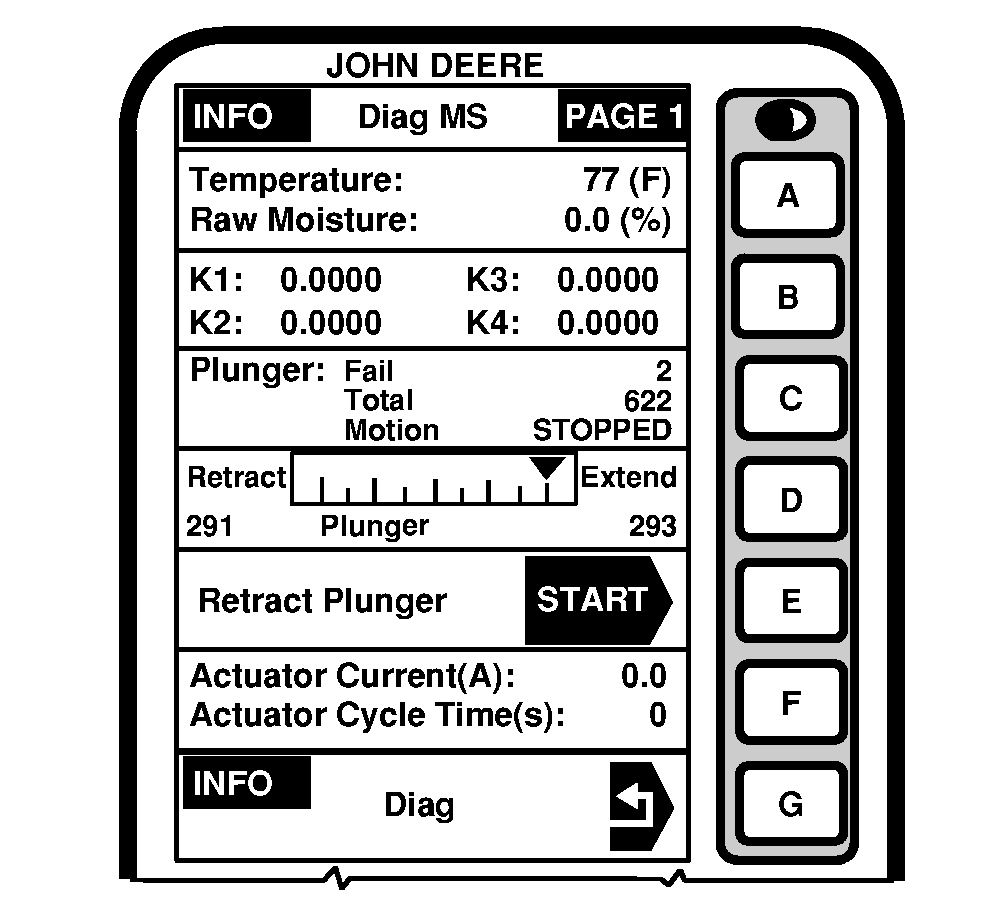
INFO - Diag MS - PAGE 1
Moisture Sensor
Press letter button next to "Moisture Sensor" on INFO - Diagnostics screen to access INFO - Diag MS - PAGE 1.
This page shows detailed information about the moisture sensor. This information will help troubleshoot moisture sensor if a problem occurs.
Grain Temperature Cell
NOTE:
To change from English to Metric measurements, refer to GREENSTAR DISPLAY in GREENSTAR Display Setup section.
Temperature cell shows temperature in Celsius (Fahrenheit) of grain in moisture sensor. Display setup determines units of measurement.
Raw Moisture Cell
Raw moisture cell shows moisture sensor measured values without user moisture correction applied.
K - Values Cell
For factory use only.
Plunger Cell
 CAUTION:
To prevent personal injury, shut off engine, set parking brake and remove key before entering grain tank. CAUTION:
To prevent personal injury, shut off engine, set parking brake and remove key before entering grain tank.
NOTE:
If plunger is retracted, cycle power to extend plunger.
"Plunger: Fail, Total, Motion", "Plunger Position" and "Retract Plunger" cells show the diagnostics for the plunger, plunger position and allows the operator to retract the plunger and clean moisture sensor.
|