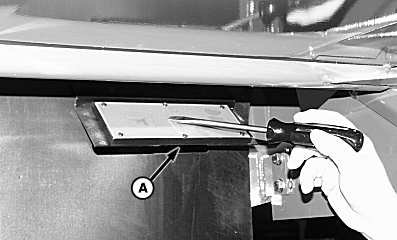
VISIONTRAK Operational ChecksNOTE: Two people are required to perform this operational check. One person must remain seated in the operators seat, while the other person taps on the sensors. 1. Turn key switch to the "RUN" position, but do not start combine. 2. Engage header switch. 3. Press seed size button for closest seed size. 4. Press calibration button. 5. Using a screw driver or a knife blade, tap on the right-hand shoe sensor (A) several times. The person watching the VISIONTRAK display should see movement of the shoe loss indicator. Repeat on left-hand side shoe sensor. |
|
OUO6075,00037B9 -19-12OCT04-1/2 |
|
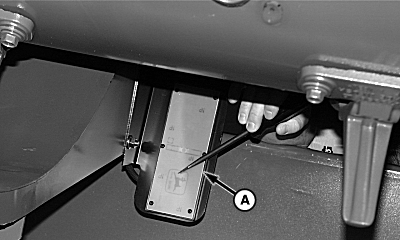
6.
Using a screw driver or a knife blade, tap on the separator sensor (A) several times. The person watching the VISIONTRAK display should see movement of the separator loss indicator.
7. Disengage header switch and turn key switch OFF. 8. If VISIONTRAK monitor system does not work after these checks, see your John Deere dealer.
|
|
OUO6075,00037B9 -19-12OCT04-2/2 |