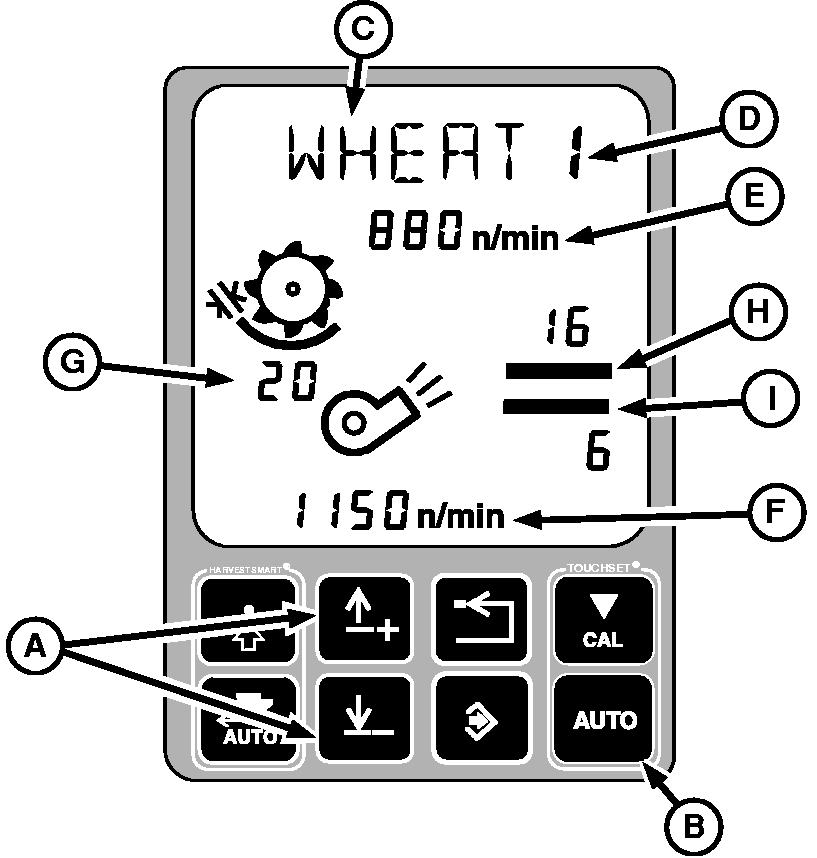
Adjusting Predefined SettingsNOTE: Adjustments of threshing speed should take less than 50 seconds. If threshing speed is not reached in allotted time an error code will appear. Adjustments of concave clearance should take less than 30 seconds. If concave clearance is not reached in allotted time an error code will appear. Adjustments of fan speed should take less than 130 seconds. If fan speed is not reached in allotted time an error code will appear. Adjustments of the chaffer or sieve should take less than 45 seconds. If chaffer or sieve clearance is not reached in allotted time an error code will appear. 1. Push up or down arrow buttons (A) to scroll through the different crop settings. 2. To adjust to desired crop settings (D), separator must be engaged, and engine at high idle. 3. Press TOUCHSET auto button (B). 4. Crop name (C) will be displayed as actual positions for threshing speed (E), fan speed (F), concave clearance (G), chaffer clearance (H), sieve clearance (I) are being adjusted. Number will flash until respective positions are reached or adjusted manually. 5. Pressing back button will stop automatic adjustment. |
|
OUO6075,000385F -19-29JUN04-1/1 |