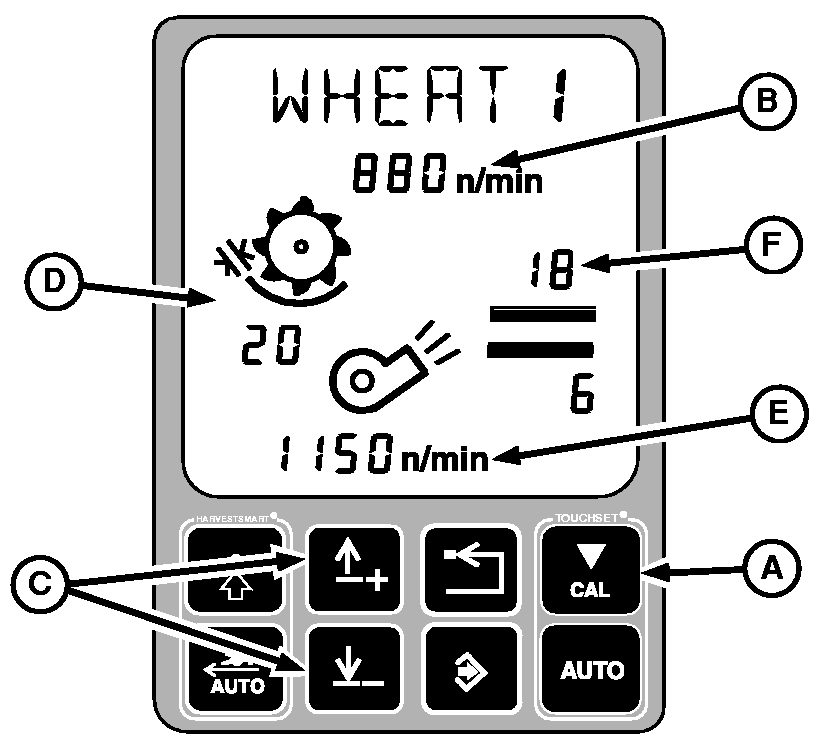
Setting Personal CROP1 - CROP5 and Factory CROP2 (WHEAT 2) Settings (Manual Calibration)NOTE: During harvest (separator engaged, header engaged, engine at high idle) TOUCHSET calibration button must be pressed twice in consecutive order to begin manual calibration. Before harvesting pressing TOUCHSET calibration button once will begin manual calibration. 1. Press TOUCHSET calibration button (A). Threshing speed (B) setting will flash.2. Press up or down arrow button (C) to increase or decrease threshing speed in increments of ten. NOTE: By holding up or down arrow button for more than four seconds threshing speed will increase or decrease by increments of one hundred. 3. Press TOUCHSET calibration button. Concave clearance setting (D) will flash. 4. Press up or down arrow button to increase or decrease concave clearance in increments of one. NOTE: By pressing and holding up or down arrow button for more than four seconds concave clearance will increase or decrease by increments of ten. 5. Press TOUCHSET calibration button. Fan speed setting (E) will flash. 6. Press up or down arrow button to increase or decrease fan speed in increments of ten. NOTE: By holding up or down arrow for more than four seconds fan speed will increase or decrease by increments of one hundred. 7. Press TOUCHSET calibration button. Chaffer clearance number (F) setting will flash. 8. Press up or down arrow button to increase or decrease chaffer clearance in increments of one. |
|
OUO6075,0003861 -19-29JUN04-1/2 |
|
9.
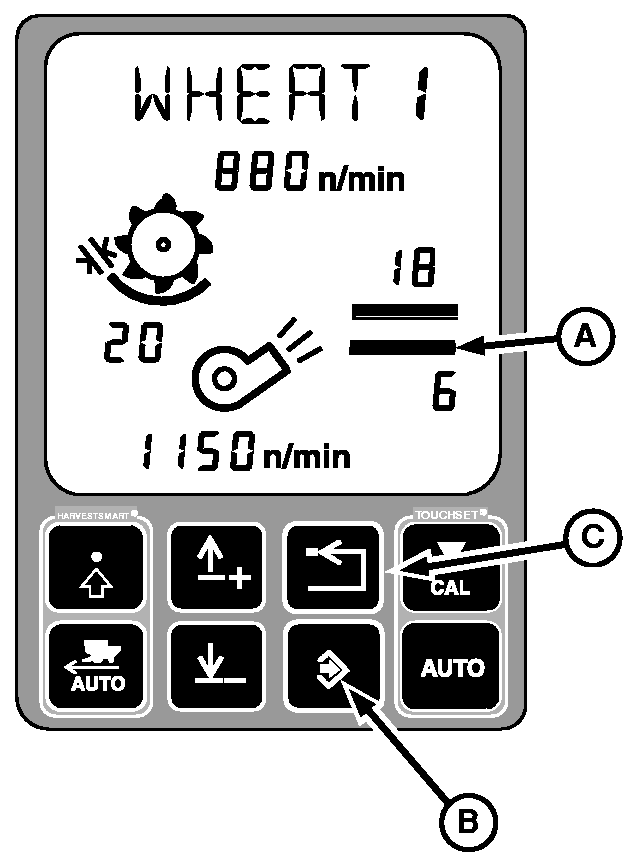
Press TOUCHSET calibration button. Sieve clearance number (A) setting will flash.
10. Press up or down arrow button to increase or decrease sieve clearance in increments of one. NOTE: If calibrating Factory 2 Crop settings, pressing calibration button will advance to threshing speed again, since the name cannot be changed. 11. Press TOUCHSET calibration button to move to crop name settings. 12. First character in name will start to flash. 13. Press up or down arrow button to change to desired letter. 14. Advance to next letter in name by pressing TOUCHSET calibration button. Repeat through all characters. 15. Press enter button (B) to end calibration. Text will alternate between name and EOC. 16. Press enter button again will save calibration. 17. Press back or abort button (C) to exit without saving. Text will alternate between name and abort, and settings are not saved |
|
OUO6075,0003861 -19-29JUN04-2/2 |